ERPC Expands Crypto Pay to Monthly and Annual Plans — Use Discounted Plans with SOL and USDC / EURC Stablecoins
ERPC Expands Crypto Pay to Monthly and Annual Plans — Use Discounted Plans with SOL and USDC / EURC Stablecoins
ELSOUL LABO B.V. (Headquarters: Amsterdam, the Netherlands; CEO: Fumitake Kawasaki) and Validators DAO, the operators of ERPC, have expanded Solana crypto payment support to monthly and annual plan payments in the ERPC Dashboard.
With this expansion, users can top up ERPC Credits with SOL and the USDC / EURC stablecoins, then use those Credits to pay for monthly and annual plans. Annual discounts of up to 30% and other dashboard-applied discounts remain reflected in the cart, so users can add the required Credits from a Solana wallet and proceed to checkout with the discounted amount already visible.
ERPC already supports ERPC Credit purchases with SOL / USDC / EURC and the use of those Credits for hourly billing. This feature expansion extends that path beyond short one-hour validation and into the monthly and annual plans selected for production operation and longer-term use.
Many customers have asked to use ERPC with crypto assets. For teams building and operating on Solana, being able to handle infrastructure costs through a payment path close to their existing wallet-based treasury workflow reduces meaningful onboarding friction.
For teams evaluating ERPC, the practical change is straightforward: after the dashboard shows the final discounted cart amount, they can fund the required Credits and use the same path again when preparing renewals. This is a reduction in friction across validation, subscription checkout, renewal, and longer-term operation, not just another payment button.
ERPC Dashboard: https://dashboard.erpc.global/en
ERPC Official Website: https://erpc.global/en
From the Monthly and Annual Plan Cart Directly to Crypto Pay
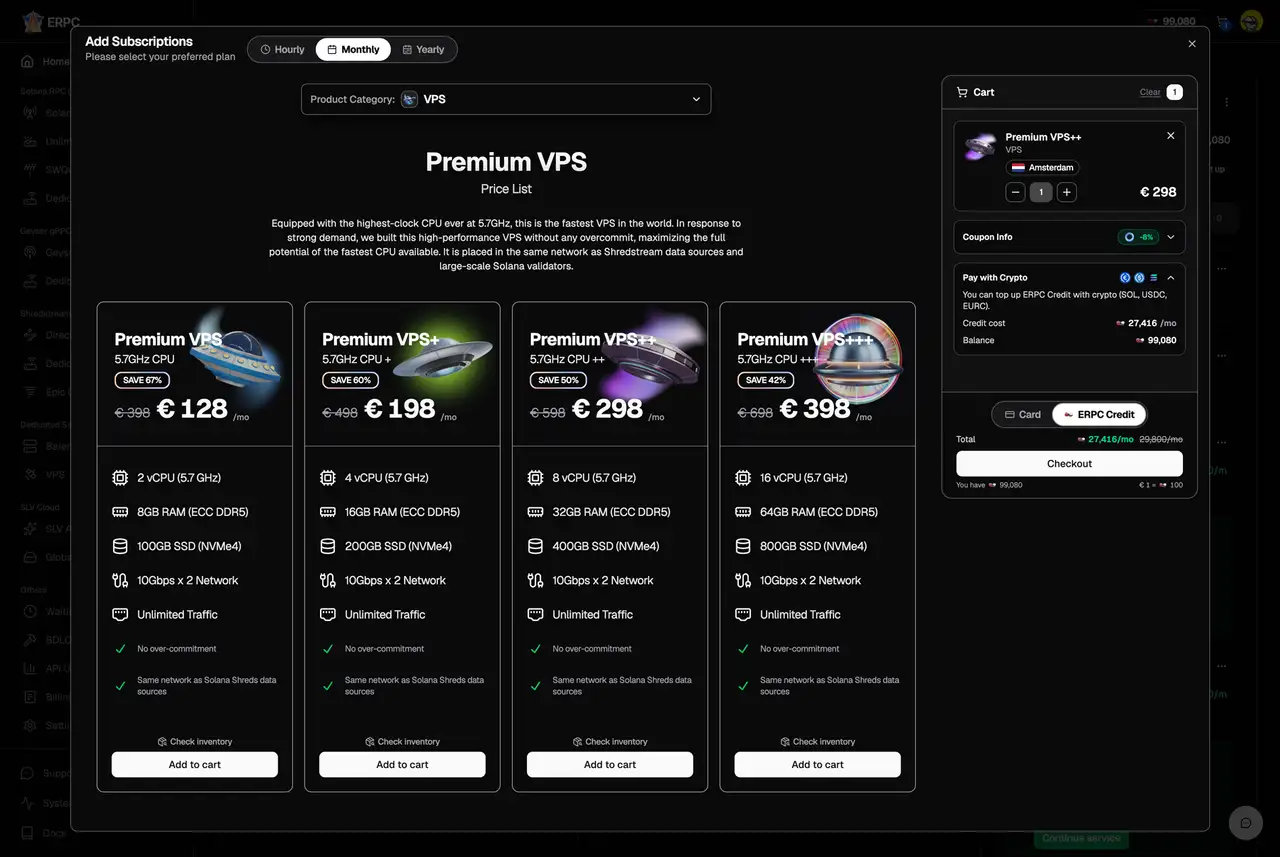
In the ERPC Dashboard, users can select a subscription type from the add-subscription screen and add the target resources to the cart. After reviewing the amount that reflects monthly or annual billing, region, quantity, bundles, coupons, annual discounts, and other applicable pricing rules, users can top up the required ERPC Credits through Crypto Pay.
This means users do not need to prepare a credit card first. They can add the balance needed for the contract with SOL or stablecoins such as USDC / EURC, then continue directly to checkout. Discounted monthly and annual plans can now be paid from Solana wallet assets through the normal dashboard path.
Monthly and Annual Plans Available from the ERPC Dashboard Are Eligible
This feature expansion applies to monthly and annual plans that can be contracted from the ERPC Dashboard.
Eligible plans include Solana RPC, WebSocket, Solana Geyser gRPC, Solana Shredstream, Direct UDP Stream (Raw Shreds), VPS, bare metal servers, dedicated RPC, SWQoS, the Pyth-compatible Price API, Jet Analytics & Indexed RPC, and other plans available from the ERPC Dashboard.
For monthly plans, users can keep the required resources running while replenishing their Credit balance from a Solana wallet. For annual plans, users can review pricing with discounts of up to 30% applied, add the required ERPC Credits through Crypto Pay, and use them for longer-term payment.
Top Up After Reviewing the Discounted Amount
Because Crypto Pay now covers monthly and annual plans, users can review the discounted amount in the dashboard and top up the Credits required for that amount.
Annual plans can receive discounts of up to 30%. Monthly plans can also reflect eligible bundle discounts and coupons in the cart. Even when a configuration combines multiple VPS instances, Direct Shreds, Solana RPC products, and other resources, users can review the Credits required after discounts and add the balance with SOL and USDC / EURC stablecoins.
The important point is not only that Credits can be purchased with crypto assets. Users can also prepare payment from a Solana wallet while checking the required amount for the actual monthly or annual plan cart after discounts have been applied.
SOL and USDC / EURC Stablecoins Supported, ERPC Receives EURC
Crypto Pay lets users select EURC, USDC, or SOL as the payment asset. USDC and EURC are representative stablecoins used on Solana. If the user holds EURC, EURC can be sent directly. If the user selects USDC or SOL, the selected asset is swapped to EURC through Orca, and the EURC transfer to ERPC proceeds within the same payment flow.
Before signing, the payment screen shows the selected asset, input amount, received amount, rate, route, and recipient wallet. Users can pay from the Solana asset they normally use, while ERPC receives the Credit top-up in EURC.
This makes crypto payment part of the regular ERPC Dashboard flow rather than a manual invoice or custom support process. Asset selection, route review, signing, Credit reflection, and plan payment can all move through the same path.
Available for Credit Top-Ups Before Renewal
Monthly and annual plans require an ERPC Credit balance at renewal. If the Credit balance may be insufficient, an alert email is sent before renewal. After reviewing the email, users should top up the required Credits from the ERPC Dashboard before the renewal date.
Crypto Pay can be used for these pre-renewal Credit top-ups. By adding ERPC Credits with SOL, USDC, or EURC and preparing the balance required for renewal, teams can keep monthly and annual plans running more smoothly. The path is especially useful for teams that want to use stablecoins such as USDC / EURC for renewal preparation.
This renewal flow does not automatically debit a wallet. It is an operational flow in which users receive a pre-renewal notice and add the required Credits in advance. For projects that manage funds through team wallets or operations wallets, being able to confirm the required amount before renewal and prepare the balance from a Solana wallet is a practical improvement for long-term use.
One Payment Path from Short Validation to Production
ERPC currently offers three contract types: monthly, annual, and hourly. Hourly billing lets users try Solana-optimized infrastructure from one hour, then move to monthly or annual plans once the configuration and expected usage become clear.
With Crypto Pay expanded to monthly and annual plans, this entire path can stay closer to existing treasury operations. A team can add a small amount of ERPC Credits with SOL or USDC for hourly validation, then choose a monthly or annual plan when the production configuration is ready and top up the required Credits through Crypto Pay.
Across validation, comparison, migration, production operation, and renewal, teams no longer need to separate infrastructure payment into a completely different payment method. For Solana application teams, this reduces friction before real measurements and operations begin.
Infrastructure Payment That Fits Solana Team Accounting and Approvals
Many Solana application teams already manage development costs, validation costs, on-chain operations, liquidity, and reward payments through crypto wallets. For these teams, separating only infrastructure costs into another payment method can add overhead around accounting, permission management, and payment approval.
By supporting SOL and USDC / EURC stablecoins for monthly and annual ERPC plans, ERPC can be used in a way that is closer to the treasury workflows Solana teams already have. Projects can choose the payment source according to their management policy, including validation wallets, operations wallets, and team wallets.
For trading bots, real-time on-chain analytics, wallet applications, indexing workloads, monitoring systems, and AI-agent-based Solana application development, payment delays can delay validation or production launch. Expanding Crypto Pay to monthly and annual plans shortens the path from infrastructure selection to actual use.
Order, Pay, and Manage from the ERPC Dashboard
The ERPC Dashboard lets users order and manage Solana RPC, WebSocket, Geyser gRPC, Shredstream, Direct UDP Stream, VPS, bare metal servers, and other services from one place.
Plan selection, monthly / annual / hourly switching, region selection, stock checks, waitlist entry, cart addition, Credit top-up, checkout, API key and endpoint review, usage monitoring, and support ticket creation can all be handled in the same dashboard.
The ERPC Dashboard supports 16 languages: English, Japanese, Simplified Chinese, Traditional Chinese, Russian, Korean, Vietnamese, Thai, Indonesian, Hindi, Turkish, Dutch, German, French, Spanish, and Portuguese. Important actions such as payment, renewal, and support can also be handled in the language each user is most comfortable with.
ERPC Dashboard: https://dashboard.erpc.global/en
Continuous Development of Solana-Optimized Infrastructure
Behind ERPC is ELSOUL LABO's ongoing research and development of Solana-optimized infrastructure. ELSOUL LABO has been approved under the Dutch government's WBSO research and development support program for five consecutive years since 2022. The company continues R&D across Solana RPC infrastructure, validator operations, real-time data delivery, AI-agent-based operations and development support, and platform-wide user experience. The results are reflected in ERPC, SLV, SLV AI, and the AS200261 Solana-optimized data center.
This Crypto Pay expansion improves not only speed and infrastructure performance, but also the path across contract selection, payment, renewal, and validation start. ERPC will continue improving both product capabilities and usage flows so Solana developers can use high-performance infrastructure close to the Solana network exactly when and how much they need it.
Contact
For questions about Crypto Pay for monthly and annual plans, ERPC Credit top-ups with SOL / USDC / EURC, pre-renewal Credit preparation, annual discounts, eligible plans, service configuration, API keys, usage, and billing, please use the support ticket form in the ERPC Dashboard. You can share details in the language you are most comfortable with.
ERPC Dashboard: https://dashboard.erpc.global/en
ERPC Dashboard Support: https://dashboard.erpc.global/en/user/support
ERPC Official Website: https://erpc.global/en
Validators DAO Official Discord: https://discord.gg/C7ZQSrCkYR
News