





Choosing a Solana VPS or Bare Metal Server: CPU, UDP, and Network Performance

Why your server matters as much as your Solana stream
You subscribe to a fast Solana feed, but the application still receives updates late or incompletely. CPU usage looks modest and the server advertises 1 Gbps. What is missing? Often the answer lies outside the CPU model and port speed. This guide combines anonymized technical investigations, independent tests, and published benchmarks to explain how to choose and verify a Solana VPS or Bare Metal server. No hosting company is singled out: the issue is whether the execution environment fits your workload.
Solana is both fast and data intensive
Raw Shreds and Yellowstone Geyser gRPC may deliver large amounts of data continuously, with short bursts. Bandwidth, packets per second (PPS), RTT, jitter, loss and application processing time are different metrics. A hypothetical 4 MB/s sustained for 30 days amounts to about 10.4 TB, but averages only 32 Mbps. That number alone does not justify a 10 Gbps port or rule out 1 Gbps. Packet-policy limits, burst capacity, receiver queues and the real path must also be measured.
A stream can run while the data remains incomplete
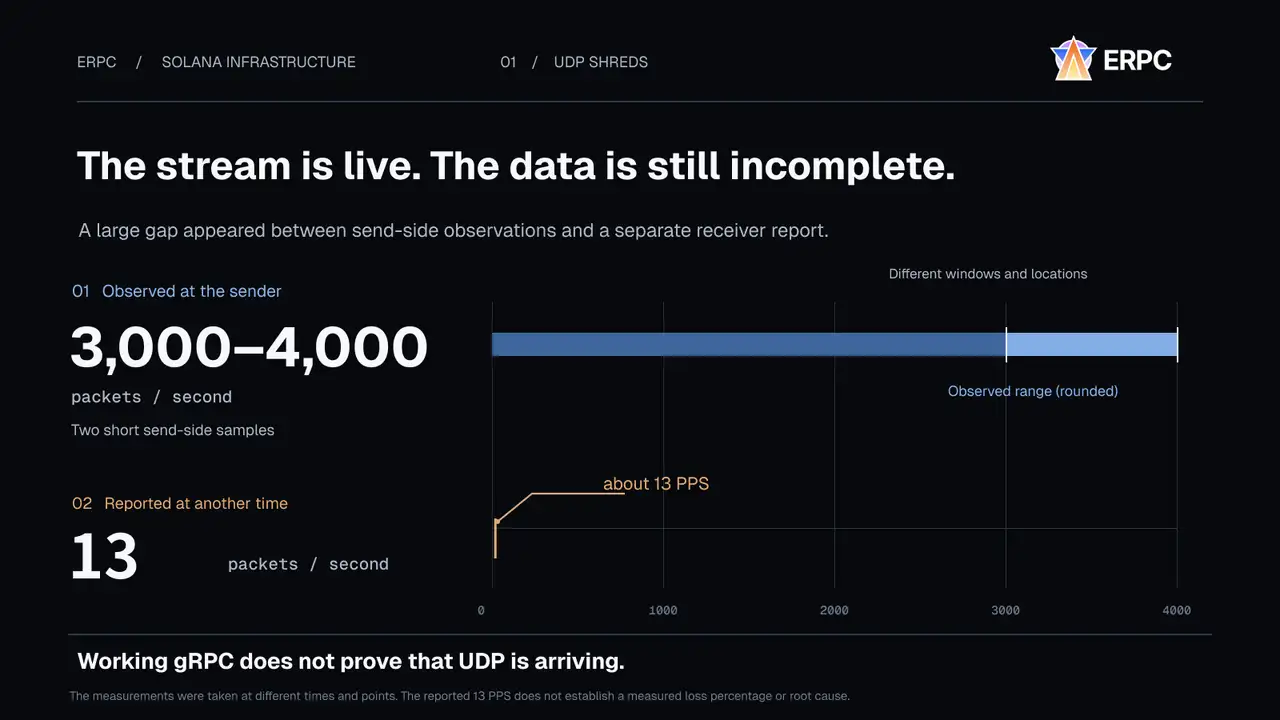
One anonymized UDP investigation recorded approximately 3,400–3,900 packets/s at the sender and a separately reported approximately 13 packets/s at a receiver. Valid Shreds were observed but the required data could not be reconstructed; gRPC was working on that host. Crucially, the two observations were taken at different times and locations. They do not establish a 99% loss rate or identify the cause. Even a normal PPS rate can be blocked or mishandled by a specific network configuration. Working gRPC does not prove working UDP.
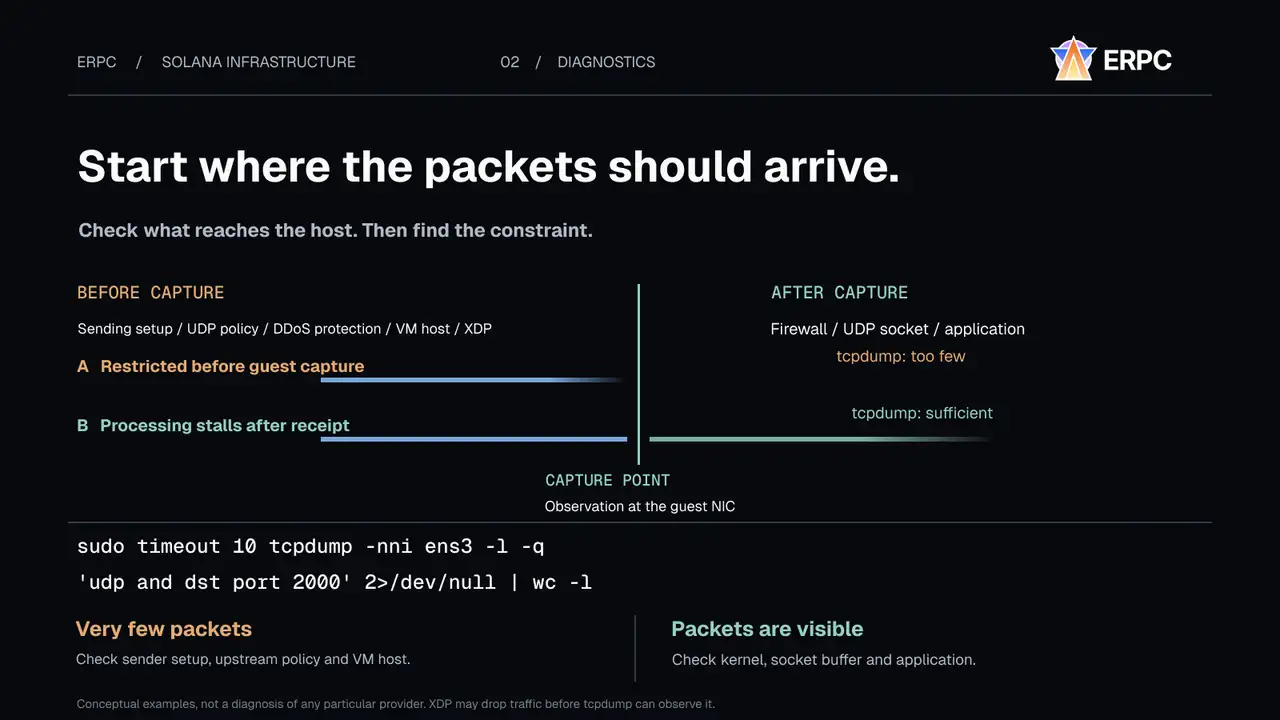
Find the observation point before changing the machine
A UDP packet can be filtered by upstream DDoS protection or an operating policy, dropped by the virtualization host, or lost after entering the guest NIC through kernel, socket or application backpressure. Start by capturing traffic on the intended interface and comparing sender and receiver measurements in the same interval. Inspect NIC drop counters, UDP receive-buffer errors and application queues. XDP processing can drop packets before tcpdump sees them. A missing packet in one capture does not prove an upstream provider fault.
Near in the same city is not necessarily a short network path
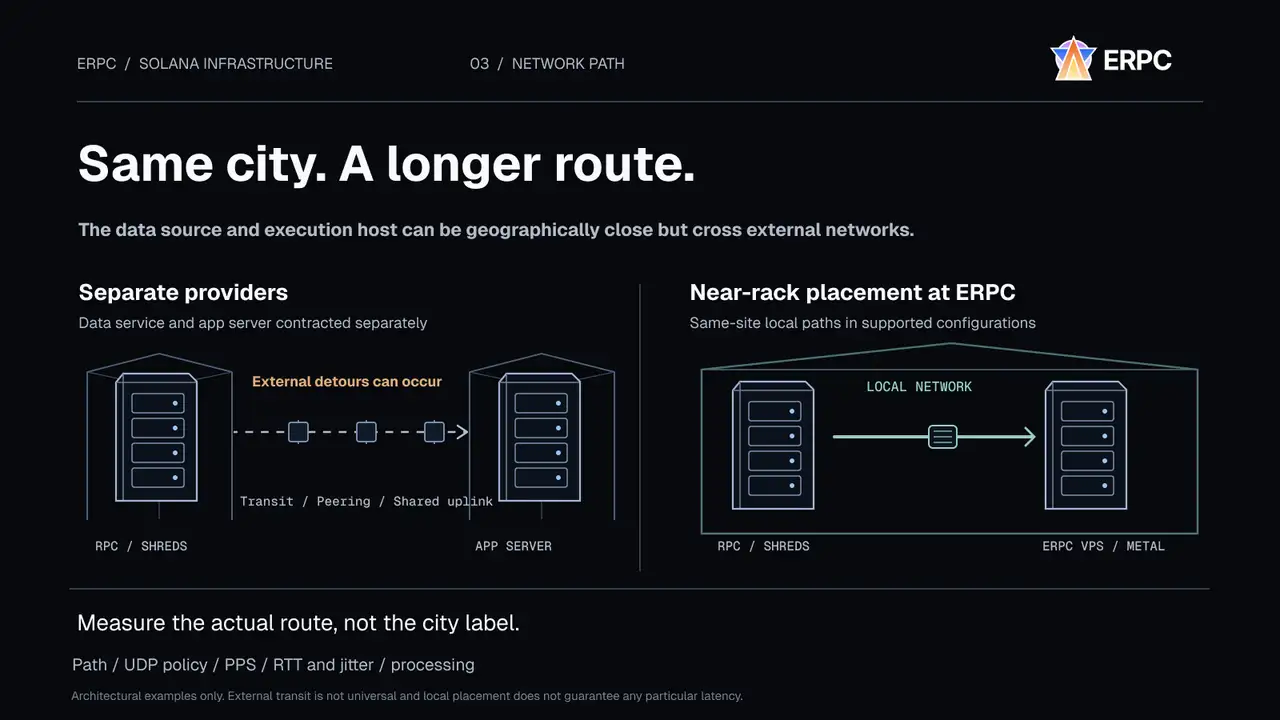
Two servers in Frankfurt can be in different facilities and autonomous systems; traffic may leave one site through transit or peering before arriving at another. An investigation involving two physically close Amsterdam endpoints found approximately 11 ms and 23 ms RTT from the same external host, although the endpoints were roughly 0.1 ms apart from each other. At other times that upstream path exhibited 5–8% packet loss and approximately 5 ms of additional delay. These observations are path-specific, not representative of all providers.
Move execution closer to the data source
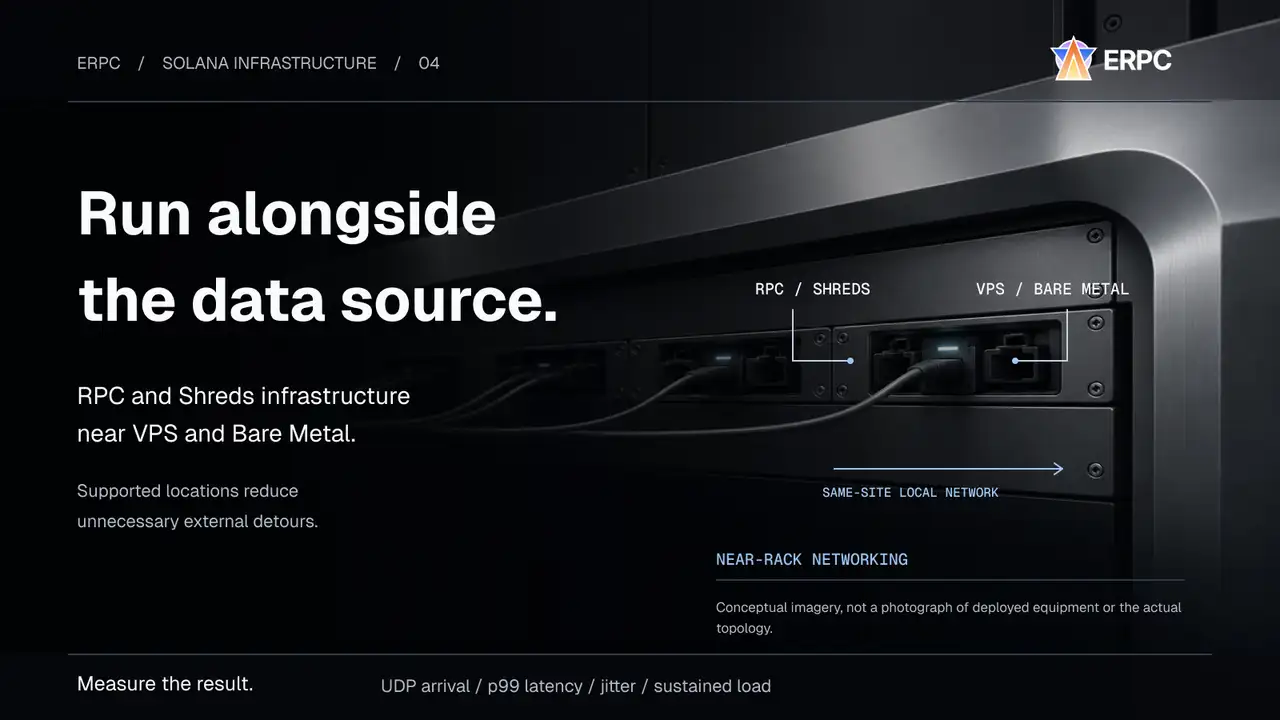
An RPC provider supplies Solana data and a hosting company supplies the compute server; the two rarely guarantee nearby racks. ERPC designs RPC, Shreds and Geyser gRPC alongside VPS and Bare Metal. At supported sites the data source and execution host can communicate on a short, local path without unnecessary external detours. This is the principle of Zero-Distance Communication, not a claim of literally zero latency. Private addressing alone does not imply a faster path; what matters is the measured route.
Compare the data delivered to the application
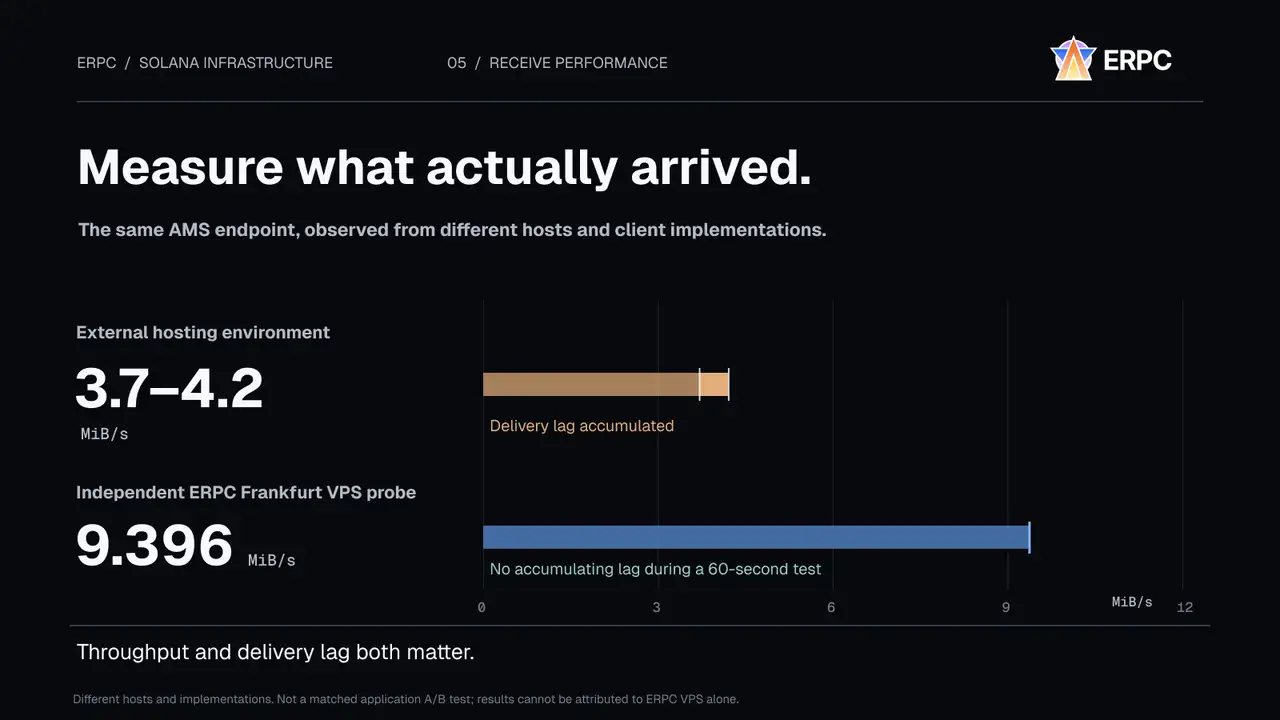
On a comparable Geyser gRPC subscription from an Amsterdam endpoint, an external hosting environment measured 3.7–4.2 MiB/s while delivery lag continued to grow. An independent ERPC Frankfurt VPS probe restricted to one CPU averaged 9.396 MiB/s and about 1,910 tx/s for 60 seconds without accumulating lag. Socket inspection on the problematic flow showed retransmissions. The host and client implementations differed, so this is not a controlled A/B test and does not establish a guaranteed ERPC performance multiplier. Another isolated HTTP/2 experiment saw 2.7 MB/s with a 16 KiB receive window versus up to 7.1 MB/s using a larger window. Bandwidth is not the only limit.
The CPU model hides boost and scheduling limits
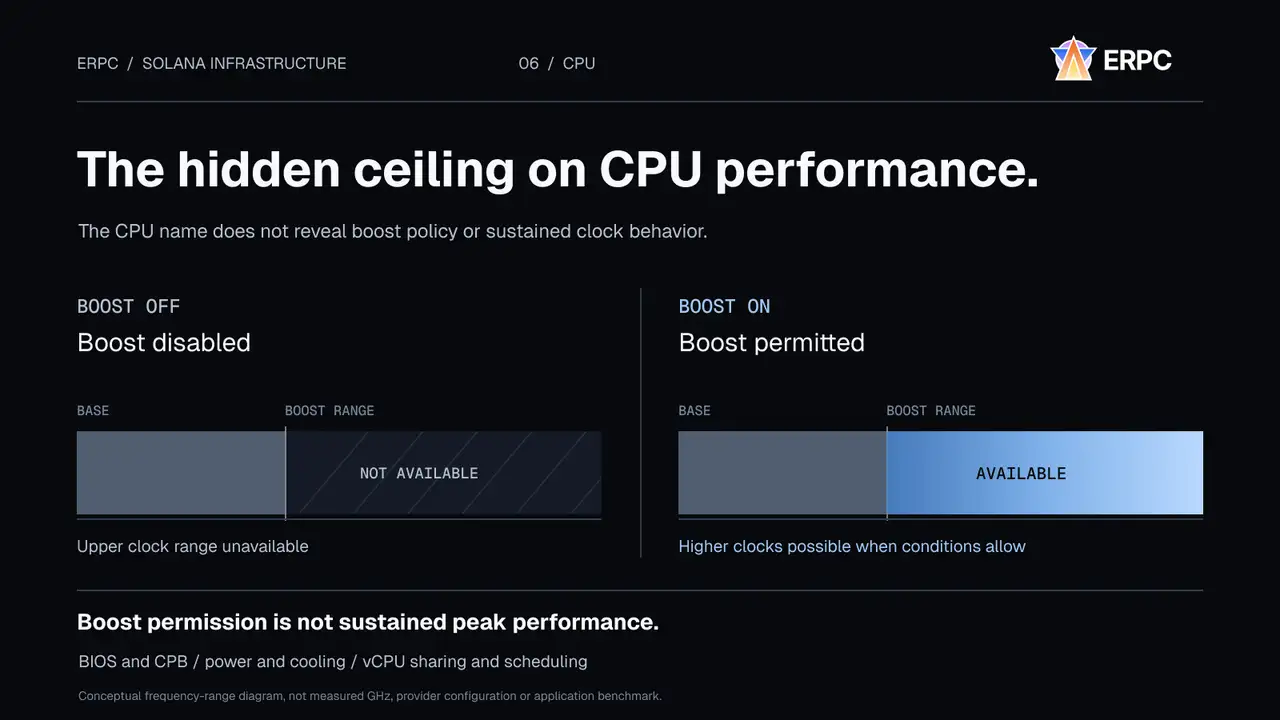
Two VMs can report the same CPU generation and vCPU count while differing in BIOS boost settings, power caps, cooling, frequency stability and CPU sharing. AMD Core Performance Boost and Intel Turbo Boost can be disabled. Even when enabled, higher clocks require thermal and electrical headroom and are not guaranteed under sustained load. A guest VM may not expose the host's boost policy. Measure sustained performance with the actual application rather than inferring speed from the CPU name.
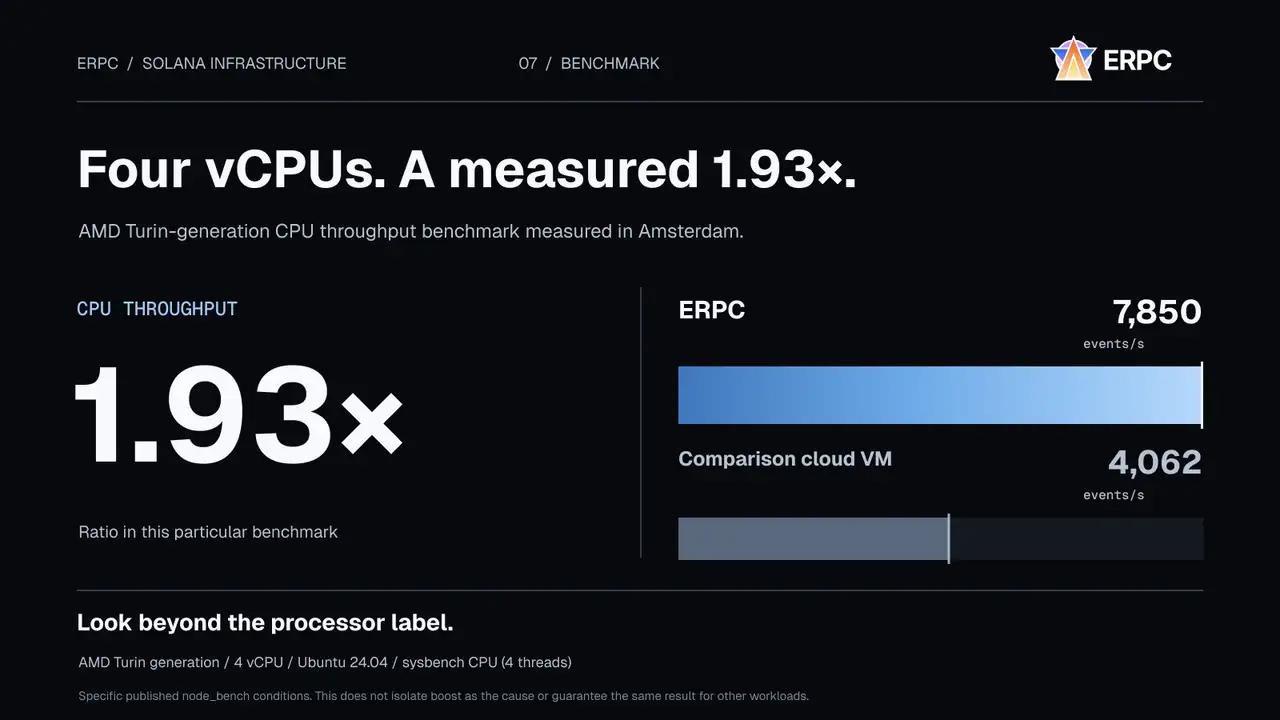
Four vCPUs, a 1.93× CPU benchmark difference
ERPC's published node_bench comparison in Amsterdam used AMD Turin-generation 4-vCPU Ubuntu 24.04 systems. The sysbench CPU result was 7,850 events/s on ERPC and 4,062 on the comparison cloud VM, a 1.93× difference in that test. The published comparison also reports about 3.2× memory bandwidth and 16.6× 4K random-read IOPS differences. These figures do not prove that CPU boost alone caused the difference or that all real workloads will run 1.93× faster.
Why hosting economics and cloud transfer costs matter
Servers require investment in electricity, cooling, network capacity and staff. Sharing resources and prioritizing power efficiency is rational for common workloads. Sustained Solana packet processing, low-latency trading and large streaming subscriptions can stress those shared systems in different ways. Providers may use shared uplinks, per-flow limits, DDoS controls and energy policies. Ask about them without treating cost optimization as negligence. Cloud ingress may be free while egress, inter-zone and service-to-service transfers are billable; total cost depends on where bytes flow. Eligible ERPC platform-local traffic is treated separately from external transfer allowances, subject to current plan terms.
Choose by workload, not by advertised specifications
A small EPYC VPS may serve light RPC or filtered subscriptions; sustained analytics may call for SUPER VPS; latency-sensitive Shreds applications need appropriate UDP admission, near-rack placement, packet processing and stable detection time. Bare Metal is justified when physical cores, NIC control or exclusive memory are needed, but it is not automatically faster in every use case. Splitting the workload across two VPS instances can also be effective. Benchmark identical software, subscriptions, filters and time windows. Track useful events detected, unique valid Shreds, reconstructed entries, arrival PPS, lag, loss counters, TCP retransmissions, p95/p99 latency and cost. Synchronize clocks before comparing cross-host timestamps.
Start with measurements, then commit to a server
On Linux you can begin with short, read-only checks. Replace the documentation IP and interface before testing. Use controlled windows on live services; the capture itself may drop packets and NIC counters can be host-wide.
bash
IFACE=ens3
SRC_IP=203.0.113.10  # documentation address; replace
PORT=2000
sudo timeout -s INT 10 tcpdump -nni "$IFACE" -l -q \
  "udp and src host $SRC_IP and dst port $PORT" 2>/dev/null | wc -l
nstat -az UdpInErrors UdpRcvbufErrors
ip -s link show dev "$IFACE"
sudo ethtool -S "$IFACE" | grep -Ei 'drop|miss|err|fifo'
ss -tin
lscpuIFACE=ens3
SRC_IP=203.0.113.10 # documentation address; replace
PORT=2000
sudo timeout -s INT 10 tcpdump -nni "$IFACE" -l -q \
"udp and src host $SRC_IP and dst port $PORT" 2>/dev/null | wc -l
nstat -az UdpInErrors UdpRcvbufErrors
ip -s link show dev "$IFACE"
sudo ethtool -S "$IFACE" | grep -Ei 'drop|miss|err|fifo'
ss -tin
lscpulscpu cannot confirm a hypervisor's boost policy. ERPC offers hourly access for eligible VPS and Bare Metal configurations, subject to current stock. Compare your actual application near the data source with your present setup. The right machine is the one that delivers the required usable data within your latency budget, not the one with the most impressive specifications.