







FAQ - Geyser gRPC Stream
Q. In which regions are your nodes located?
We currently operate nodes in the following regions:
- Frankfurt (FRA)
- Amsterdam (AMS)
- London (LON)
- New York (NY)
- Tokyo (TY)
- Singapore (SGP)
- Sydney (SYD)
ERPC measures actual network latency based on real routing paths, automatically selecting the region with the lowest latency rather than relying on straight-line distance. This approach not only improves latency for individual users but also enhances overall network efficiency and strengthens ERPC’s global resilience against potential attacks.
If your environment does not automatically select the optimal region, please contact us through the ERPC Web Dashboard.
ERPC Web Dashboard: https://dashboard.erpc.global/en
Q. Latency shows 9999ms and a non-optimal region gets selected. What should I do?
For gRPC region selection, ERPC sends ICMP latency probes to your registered IP from the proxy hosts listed below. Allow inbound ICMP echo requests from every listed source IP. If they are blocked by a firewall (ufw, cloud firewall, security group, etc.), the measurement can become
9999ms and a non-optimal region may be selected. Multiple IPs in one region are separate probe hosts; all of them are required.| Region | ICMP source IPs |
|---|---|
| 🇳🇱 Amsterdam | 82.21.43.34, 151.244.92.36 |
| 🇺🇸 New York | 151.243.244.5 |
| 🇩🇪 Frankfurt | 151.241.178.20, 151.241.178.34, 151.241.178.21 |
| 🇬🇧 London | 151.241.65.4 |
| 🇯🇵 Tokyo | 143.20.238.66 |
| 🇸🇬 Singapore | 151.245.186.2 |
| 🛰️ Far Point | 143.20.238.73 |
Q. I allowlisted my IP, but I still cannot connect. What should I check?
ERPC gRPC and Shreds endpoints use plain HTTP on port 80, protected by IP allowlisting. They do not use HTTPS/TLS on port 443.
If you copy a client example from another provider, it may default to
:443 or HTTPS. Replacing only the domain can leave the port and TLS settings unchanged, which will prevent the connection from working.The endpoints below are examples. Replace them with your own endpoint shown in the dashboard. Use it in HTTP form, or specify port 80 explicitly when your client requires a host and port:
Regular gRPC
- Not valid:
grpc-fra1-1.erpc.global:443 - Valid:
grpc-fra1-1.erpc.global:80 - Valid URL form:
http://grpc-fra1-1.erpc.global
Burst gRPC
- Not valid:
grpc-fra1-burst.erpc.global:443 - Valid:
grpc-fra1-burst.erpc.global:80 - Valid URL form:
http://grpc-fra1-burst.erpc.global
Authentication is based on your registered IP address. Do not add
x-token, token, or Authorization headers for ERPC gRPC or Shreds endpoints unless a specific product page explicitly tells you to do so.Q. What is Geyser gRPC Burst?
Geyser gRPC Burst is ERPC's low-latency shared gRPC tier for latency-sensitive Solana stream workloads. It provides the same Yellowstone/Geyser gRPC interface as the regular gRPC service, including account, transaction, slot, and block subscriptions, while using Burst-specific regional infrastructure.
Burst currently runs in Frankfurt, Amsterdam, and New York. The system selects the best available Burst region for your registered IP based on real latency measurements.
Q. Which IPs should I allowlist for Burst gRPC?
Burst uses the same regional ICMP probe sources listed above for latency-based region selection. The addresses below are Burst client endpoint IPs, not ICMP probe sources; allow them only if your outbound firewall restricts connections to the selected endpoint.
| Region | Burst Domain | IP Address |
|---|---|---|
| 🇩🇪 Frankfurt | grpc-fra1-burst.erpc.global | 64.130.41.234 |
| 🇳🇱 Amsterdam | grpc-ams1-burst.erpc.global | 64.130.55.180 |
| 🇺🇸 New York | grpc-ny6-burst.erpc.global | 64.130.59.217 |
If the ICMP probe sources above are blocked, the ERPC Dashboard may show
9999ms and Burst may select a non-optimal region. Blocking a Burst endpoint address affects client connectivity, not latency measurement.Q. Is Burst the same as Direct Shreds or ShredStream?
No. Burst is full Yellowstone/Geyser gRPC over the standard gRPC interface. It is suitable when you need block, slot, transaction, or account streams from a gRPC client.
Direct Shreds / ShredStream is a separate UDP-based product for raw shred data and can be preferable when the earliest possible pre-block data path is the priority. The two products serve different interfaces and workloads.
Q. I've only used WebSocket before. Can I use gRPC? Do you have samples?
Yes. You can quickly test and start developing with gRPC using SLV.
For a shared endpoint that you can test without a token, run:
bash
slv check grpc --endpoint <YOUR_ENDPOINT> --token noneslv check grpc --endpoint <YOUR_ENDPOINT> --token noneCheck out our gRPC Quickstart Guide for details.
Q. Can I register two IP addresses?
You can use one endpoint per subscription. If you wish to use two IP addresses, you must subscribe to two separate subscriptions.
Q. Are there any filter limits?
Shared Geyser gRPC has fair-use protections so one stream cannot consume the resources needed by other ERPC customers. Under the current Shared rule, every non-empty
blocks map is rejected, including a narrow block request. Each account filter must include an account, an owner, or a supported cuckoo filter; memcmp or dataSize alone is not enough.Remove a rejected shape and subscribe only to the data your application needs. A transaction subscription or block metadata may fit the need without carrying a full block. Dedicated Geyser gRPC is appropriate when a legitimate workload exceeds the Shared shape or resource allowance; it does not make invalid parameters valid or repair a slow client.
Q. How should I collect a gRPC error before reconnecting?
Keep the first error before a reconnect loop replaces it. Record the gRPC status and message from initial metadata and trailers, together with
x-erpc-error-code, x-erpc-error-reason, and x-erpc-doc-url. When ERPC supplies a pause, record x-erpc-retry-after-seconds and x-erpc-retry-at (Unix seconds) as well.An error can be displayed as
ERPC [STREAM_GUARD_SLOW_READER]: .... Paste the displayed error or its code into FAQ search. For the canonical explanation, use ERPC gRPC FAQ. Do not assume a trailer is delivered when a connection ends early.You can also search by a symptom: slow receiver, disconnected, bandwidth, delivery lag, backlog, pause, retry, invalid argument, resource exhausted, permission denied, IP registration, too many streams, full blocks, or all accounts.
Q. What does STREAM_GUARD_SLOW_READER mean with ResourceExhausted (8) when a slow receiver is disconnected?
ERPC observed insufficient write progress or delivery lag for this stream. Delivery lag alone cannot identify the cause. Check network loss, effective bandwidth, host hardware, and whether the application consumer is keeping up. Narrow the subscribed data and move processing out of the receive loop into a bounded queue. A bounded queue controls memory use but cannot fix a sustained slow consumer. If ERPC provides a retry deadline, wait for it before reconnecting.
Q. What does STREAM_GUARD_EGRESS_BUDGET mean with ResourceExhausted (8)?
Aggregate traffic from the IP exceeded the Shared allowance, so related streams can close together. Reduce data volume and unnecessary parallel streams, then wait until the returned deadline. This egress pause is fixed at 600 seconds and does not advance the penalty ladder, although an existing longer pause can remain in effect.
Q. What does STREAM_GUARD_PENALTY_ACTIVE mean with ResourceExhausted (8)?
An earlier slow-reader or egress pause remains active. Retain the first ERPC error, correct its cause, and wait for the returned deadline; do not reconnect early to test it. The first counted offense is a warning. A later offense within the one-hour first window starts a 60-second pause; later ladder steps are 300 seconds, 1800 seconds, and 86400 seconds. A disconnect shorter than 60 seconds is part of the same incident. The returned retry deadline is authoritative.
Q. What does STREAM_GUARD_SHAPE_BLOCKS mean with PermissionDenied (7)?
The current Shared rule rejects every non-empty
blocks map, even when the request is narrow. Remove the blocks map. Use transactions and/or block metadata when they meet the requirement, but neither is a full-block equivalent. Use Dedicated Geyser gRPC when full blocks are required; this does not imply that a selective-block Shared plan is available.Q. What does STREAM_GUARD_SHAPE_ACCOUNTS_ALL mean with PermissionDenied (7)?
An account-filter entry must select data with
account, owner, or a supported cuckoo filter. memcmp and dataSize on their own are not sufficient. Narrow the account request to one of those supported shapes, or use Dedicated Geyser gRPC when the full account stream is required.Q. What does STREAM_GUARD_SHAPE_REJECT_PENALTY mean with ResourceExhausted (8)?
Repeated rejected or invalid subscriptions triggered a pause. Repair the original request, keep its first ERPC error, and wait for the returned deadline. An early connection drop can look like a transport error, so preserve the first ERPC error before the reconnect loop hides it.
Q. What does STREAM_ADMISSION_LIMIT_REACHED mean with ResourceExhausted (8)?
The admission allowance is currently full. Close unused or duplicate streams, check the allowance for the connection, and retry after capacity is available. This response does not by itself mean a timed penalty is active.
Q. What does STREAM_ADMISSION_IP_NOT_ADMITTED mean with PermissionDenied (7)?
ERPC could not admit the connection, including after an IP-registration grace period expires. Compare the actual outbound IP with the registered IP and confirm the current access state. Allow a registration change to propagate, without assuming a fixed propagation time, and contact support if the condition persists.
Q. What does STREAM_ADMISSION_SOURCE_UNAVAILABLE mean with Unavailable (14)?
ERPC could not determine the source of this connection at that time. Back off and try again after a delay. If it persists, contact support with the first error and its metadata; the response does not establish a fault in the customer's network or server.
Q. What does STREAM_ADMISSION_SNAPSHOT_UNAVAILABLE mean with Unavailable (14)?
ERPC could not verify access at that time. Back off and try again after a delay, then contact support if it continues. Re-registering repeatedly, broadening filters, or purchasing Dedicated Geyser gRPC does not repair this availability response.
Q. What does ERPC_GRPC_INVALID_ARGUMENT mean with InvalidArgument (3)?
The request contains invalid parameters, options, field types, keys, or filter combinations. Repair the request before retrying. Repeated invalid requests can contribute to the existing rejection ladder, and Dedicated Geyser gRPC does not make invalid parameters valid.
The error message ends the code with
(reason: <token>), and the same token is returned in the x-erpc-error-reason response header. Find the token below to see what to change. Where a limit applies, the error message states it.| Reason | What it means | What to change |
|---|---|---|
too_many_filters | The request carries more named filters or data slices than one request may. | Use fewer named filters (or data slices) of this type per request. |
empty_filter | A filter has no address, and an empty filter means everything. | Give every filter at least one address (accounts: an account or owner; transactions: an account list). Shared gRPC does not serve an empty filter. |
too_many_addresses | One filter field lists too many addresses. | Use fewer addresses in one filter field; split them across filters or narrow the list. |
address_not_allowed | A filter names an address that shared gRPC does not allow. | Remove that high-volume address from the filter. |
filter_name_too_long | A filter name is too long. | Use shorter filter names (the map keys). |
invalid_commitment | The commitment level is not valid. | Use processed, confirmed or finalized. |
invalid_address | A filter contains an address that is not valid. | Make every address a valid base58 Solana address (no empty strings, spaces or wrong length). |
invalid_signature | The transaction signature value is not valid. | Use a valid base58 transaction signature. |
invalid_account_data_filter | An accounts data filter is not valid. | Fix the memcmp, datasize and token-account data filters, and keep their number within the limit in the message. |
invalid_data_slice | The data slices are not valid. | Sort data slices by offset and keep them non-overlapping. |
blocks_include_not_allowed | The blocks subscription options are unavailable on shared gRPC. | Omit blocks and use a transaction or blocks_meta subscription instead. |
invalid_token_accounts_mode | The token accounts mode is not valid. | Use ALL (0) or BALANCE_CHANGED (1). |
invalid_argument | None of the reasons above applies. | Check the request filter and parameters before retrying. |
Q. What does ERPC_GRPC_REQUEST_FAILED mean when gRPC returns another non-zero status?
The request failed with a valid gRPC status that determines the next step. Repair a request for a status such as
OutOfRange (11) when a history range is invalid; back off for an availability status such as Unavailable (14). Do not classify every non-zero status as transient or retry every response unchanged.Q. Which region do you recommend?
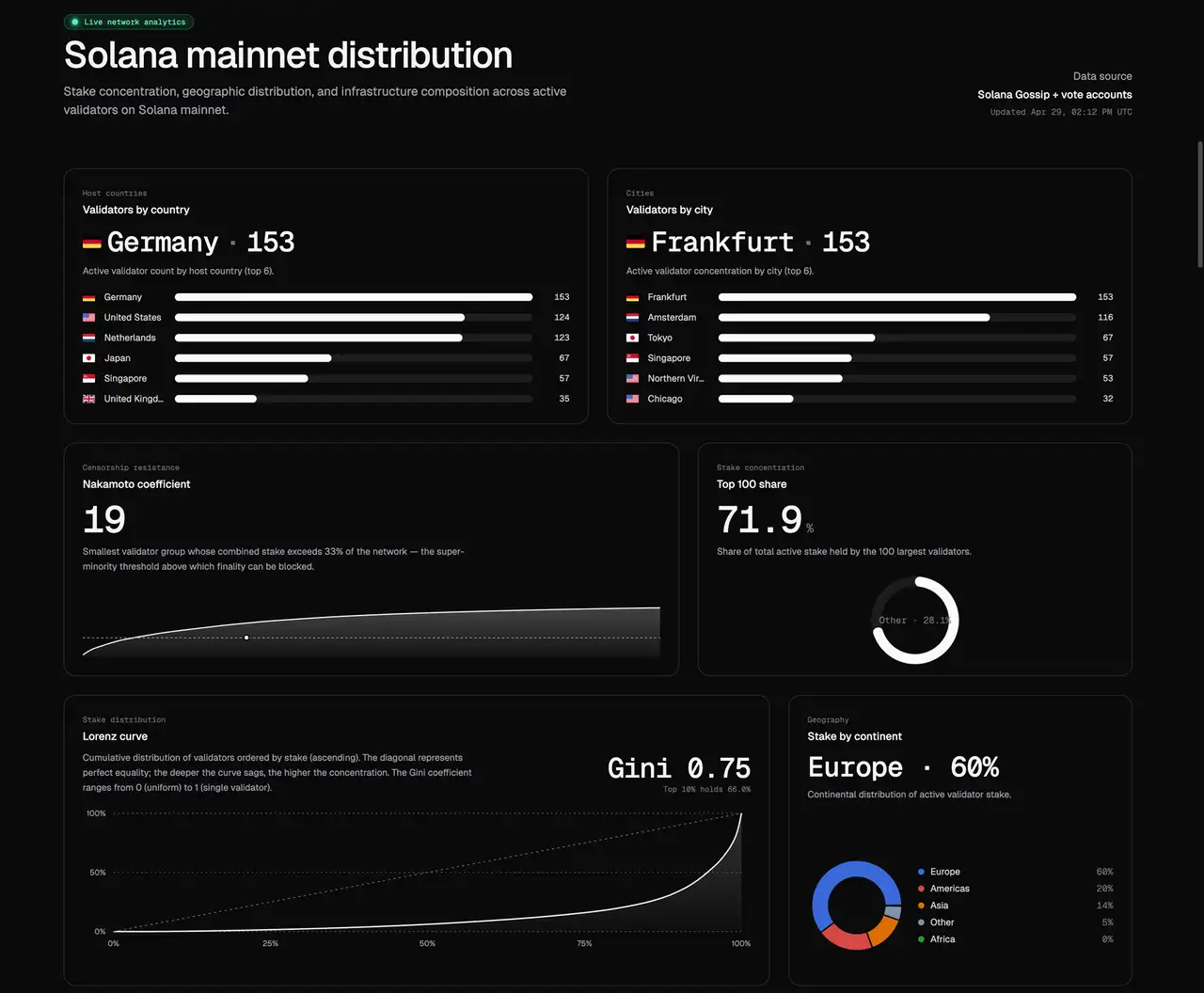
There is no single permanent best region. Solana is global, and leadership rotates across validators, slot by slot. Regions with more validators and higher stake see leader slots more often, which can help transactions land faster. The trade-off is that competing traffic also concentrates there, so a less crowded region can sometimes deliver better results depending on your strategy.
As a practical starting point, choose a validator-dense region such as Frankfurt or the US East Coast when steady leader-slot supply matters most, or place yourself near a specific target validator when shortest-path execution is the priority. Use Validators Solutions to understand public Solana network distribution, then use the ERPC Leader Slot API and real measurements to decide whether single-region, dual-region, or global deployment is appropriate.
Q. I need latency of at least ~400ms or better.
To achieve latency within approximately 400ms, consider these essential points:
-
Realistic Understanding of Ping Values: Ping values indicate ideal conditions and do not reflect actual latency in streaming communications, which typically experience around 5 times the ping latency. For example, a ping of 100ms across continents realistically results in about 500ms of latency. Thus, infrastructure must be established within the same region to achieve ~400ms latency.
- Typical Ping Value Reference:
- Same network: ~0.1ms
- Private Network Interconnect (PNI): ~0.2ms
- Same data center: ~0.3ms
- Same city: ~1ms
- Neighboring country: ~5–10ms
- Intercontinental: ~100–300ms
- Typical Ping Value Reference:
-
Avoiding the Pitfall of Average Latency: Solana validators are geographically dispersed globally, and the leader schedule changes randomly with each epoch. Relying on average latency to achieve ~400ms is impractical. Instead, you should precisely track validator schedules in your specific region to identify slots with the lowest latency. To consistently achieve minimal latency, infrastructure across all relevant regions is required. Within the same region, data acquisition can occur in tens of milliseconds, with transmission possible in just a few milliseconds.
-
Tracking the Leader Schedule: Monitor the leader validator schedule for your region using the ERPC Leader Slot API (
getLeaderSlots). It returns the upcoming leader schedule, stake weight for the current epoch, estimated validator geolocations, and reference ping values, so you can identify the lowest-latency slots to target before they arrive. Public map-style data and native RPC APIs are useful for broad network visibility, but they are not precise enough for execution timing. The Leader Slot API fills that gap with the granularity needed for routing and trading decisions.
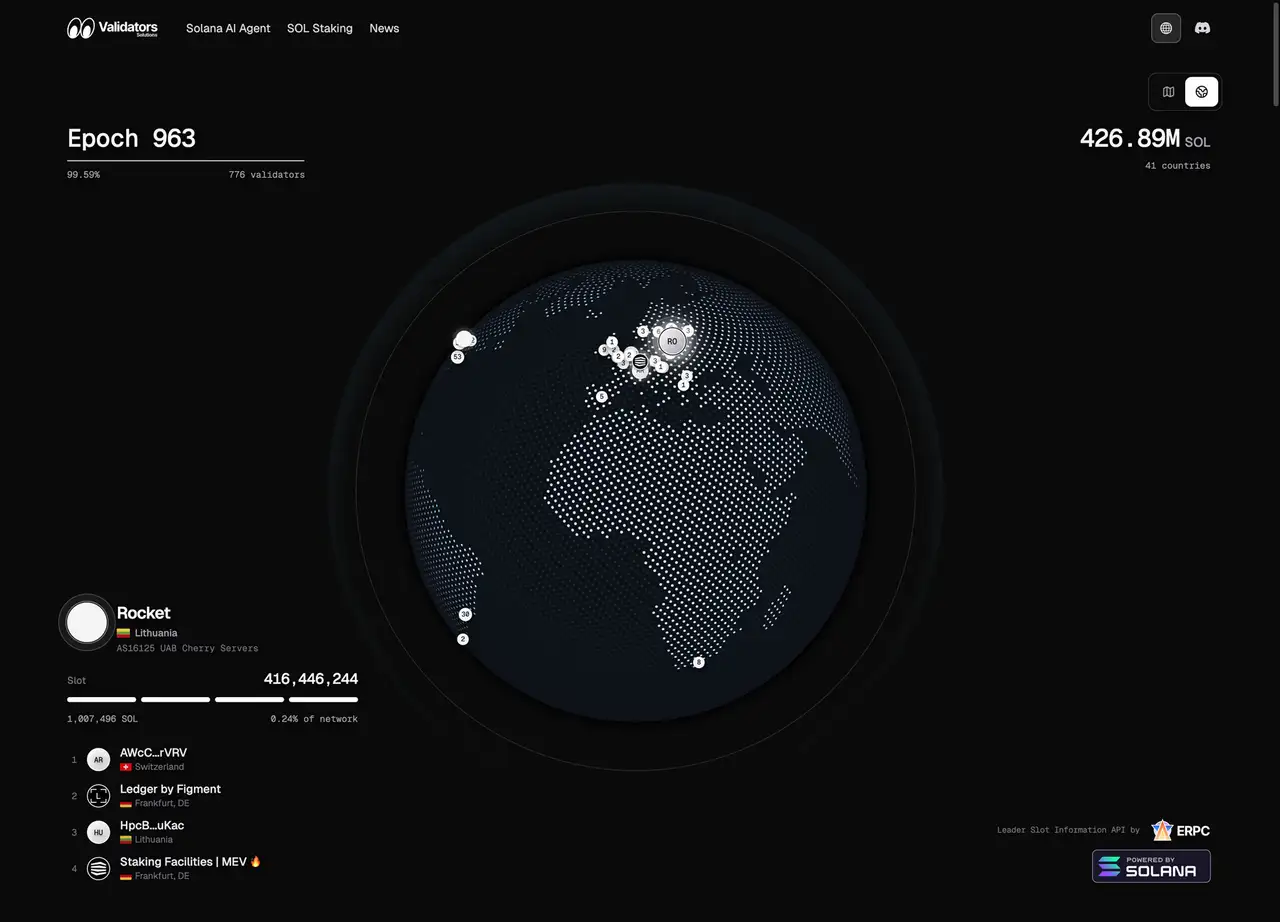
Solana network data: Validators Solutions
Q. How can I achieve zero-block (zero-slot) trading?
Successfully achieving zero-block (zero-slot) trading requires more sophisticated strategies, as follows:
-
Identifying Opportunity Zones: Solana validators are distributed globally, and it is physically impossible to achieve optimal latency for every slot. Therefore, monitor validator leader schedules in the region where your infrastructure is located and identify the most favorable opportunity zones. Deploying infrastructure across multiple regions can also be advantageous. For example, Frankfurt is a key region due to its high validator density, resulting in more frequent leader selection and greater trading opportunities.Use the ERPC Leader Slot API (
getLeaderSlots) to look up the upcoming leader schedule, stake weight for the current epoch, estimated validator geolocation data, and reference ping values with far greater precision than public map-style data sources or native RPC APIs. This lets you map opportunity zones before the slots arrive and execute near-zero-latency trades. -
Implementing Dedicated Nodes: If you struggle to compete, consider deploying dedicated nodes. Shared nodes experience latency due to traffic from other users, and thus are not recommended. Furthermore, placing your dedicated node within the same network as your application significantly reduces network latency and optimizes performance.
Q. Can I use a specific endpoint?
To maintain a low-latency environment, our system automatically selects the closest available node. If you wish to use a specific endpoint, we recommend renting a server located nearest to that endpoint.
Q. I'm getting a 401 error. Why?
To maintain a low-latency environment, we implement IP restrictions. If you don't have a subscription or your IP isn't registered, you'll receive a 401 error.
Please double-check if your registered IP matches your current access IP.
Q. I'm getting a 429 error. Why?
You have reached your plan’s connection limit.
If you encounter this error, consider upgrading your plan. If you require more connections than our premium plan provides, a dedicated gRPC node would be more suitable.
Q. Why are dedicated endpoints faster?
Shared endpoints are used by multiple customers who share the same resources. As traffic increases, latency tends to occur. Server resources have physical limits, and the amount of work they can handle is finite. When too many requests arrive at the same time, they must be processed sequentially, which results in slower response times.
Although we take various measures to optimize performance even on shared endpoints, with dedicated endpoints you are the sole user of the resource. This means you are completely unaffected by other users, ensuring consistently stable and fast responses.
In addition, dedicated endpoints provide communication options without TLS, such as HTTP. By skipping the TLS handshake (around 20ms), communication becomes even faster compared to HTTPS.
Q. Will the sale price be raised after I subscribe?
While your subscription stays active, the sale price you locked in at signup remains in effect. Environments that hold up under Solana's real-time workload are globally scarce, and we plan to step up list prices in line with growing hardware and network demand. Higher-spec configurations and high-demand regions sell through fastest, so locking in the current promotional price is the most cost-efficient choice over the long run.
Q. I want to pay with crypto
Crypto payments are available from the ERPC Web Dashboard when your registered billing address country is one of the EU member countries. You can use SOL, USDC, or EURC to purchase ERPC Credits.
Use those ERPC Credits to activate or continue ERPC plans. Open the dashboard, choose crypto payment, send the transfer from your wallet, and the dashboard will verify the transaction and apply the credits to your account.
Supported countries: Austria, Belgium, Bulgaria, Croatia, Cyprus, Czechia, Denmark, Estonia, Finland, France, Germany, Greece, Hungary, Ireland, Italy, Latvia, Lithuania, Luxembourg, Malta, Netherlands, Poland, Portugal, Romania, Slovakia, Slovenia, Spain, Sweden.
For countries not on the list, please pay by credit card.
Q. How can I achieve the lowest possible latency?
We highly recommend combining a dedicated gRPC node with our Bare-Metal server.
Both share the same network, allowing for private, zero-distance communication without traversing the internet. This setup achieves extremely low latency, typically around 0.1ms ping.
Please contact us through the ERPC Web Dashboard for further details.
Q. What is the latency like?
Latency varies depending on the measurement method and your specific usage environment. Rather than focusing on exact numerical values, it's crucial to ensure that the latency meets your actual operational requirements.
We provide easy-to-use tools in TypeScript and Rust for measuring latency.
Q. Is this RPC (gRPC, Shreds) faster than others?
We build for speed at every tier, and we're glad to have that measured side-by-side with any other provider. Results can shift with region, whether you're on a shared or dedicated endpoint, the protocol you use (WebSockets, gRPC, or Shreds), and the programming language your client runs in.
If you find our service slower, please let us know the specific conditions and competitors you've compared it against through the ERPC Web Dashboard. We will identify the cause and improve the speed further.
Q. Which plan offers the fastest performance?
Generally, our highest-tier plan provides the fastest performance due to superior CPUs, higher memory capacities, and robust hardware configurations.
We also offer customized solutions if you require even more powerful servers, but our standard plans are designed to deliver optimal price-to-performance ratios.
We are confident in providing world-class performance at every price level. If you find a faster provider within the same price range, please let us know so we can investigate and make improvements.
Q. I'm experiencing high latency. What can I do?
Latency heavily depends on your proximity to the endpoint. We recommend accessing from a server near the provided endpoint. The fastest connections are achieved with our Bare-Metal server and VPS service.
Q. Which is the fastest: WebSockets, gRPC, or Shreds?
Feedback from our customers consistently ranks speed as follows:
Shreds > gRPC > WebSockets
Please share your experience if you observe different results.
Q. Latency isn't what I expected.
Performance varies depending on the programming language used. Generally, language speed ranks:
Rust > Go > TypeScript (JavaScript) > Python
For detailed comparisons, see:
For maximum performance, we strongly recommend using Rust.