




Getting Started with Solana gRPC: Choosing the Data You Receive for Faster Trading Decisions
Connecting to a fast gRPC service does not necessarily make the data you receive immediately usable for decisions. Even updates you discard later take time to transmit, receive, read, and check for relevance. If receiving and filtering are concentrated on the same processing worker, the updates you need now also have to wait their turn.[11][14]
The starting point for improving speed is to retain the updates your decision needs while narrowing the scope and volume sent by the provider to what is necessary and sufficient. This reduces both the receiving CPU's work and the work of carrying data over the connection.[3][16]
This article considers an app that compares estimates of the USDC you would receive at two venues when selling the same amount of SOL. What should it receive, where should it filter, and how should it use the data to reach the required decision sooner?
Using gRPC data requires an app that receives and processes it. If you normally use a ready-made trading tool, you can begin by checking whether it supports gRPC input and who handles configuration or implementation. If you write your own code, there is a procedure for reviewing your subscription settings.[1][3]
The main text takes you from understanding the mechanism to defining your own use case. Section 6 includes a short request you can use even without code. Detailed settings and connection troubleshooting are collected in appendices you can return to during implementation.
1. gRPC lets you keep receiving the changes you need
gRPC is a mechanism for exchanging data between remote computers. It supports both sending a request and receiving a single response, and keeping a connection open to receive ongoing updates. This article covers the latter: a stream.[1]
For example, you can specify a condition such as “Notify me when the state of this venue changes” and receive updates matching it. Receiving data under specified conditions in this way is called subscribing. The app receiving the notifications recalculates the estimate and applies the result to its comparison screen or decision logic.[3]
In this connection, the side delivering updates is the server, and the app receiving them is the client. Even when you ultimately use the same updates, filtering before sending or after receiving changes how much data crosses the connection.[3][10]
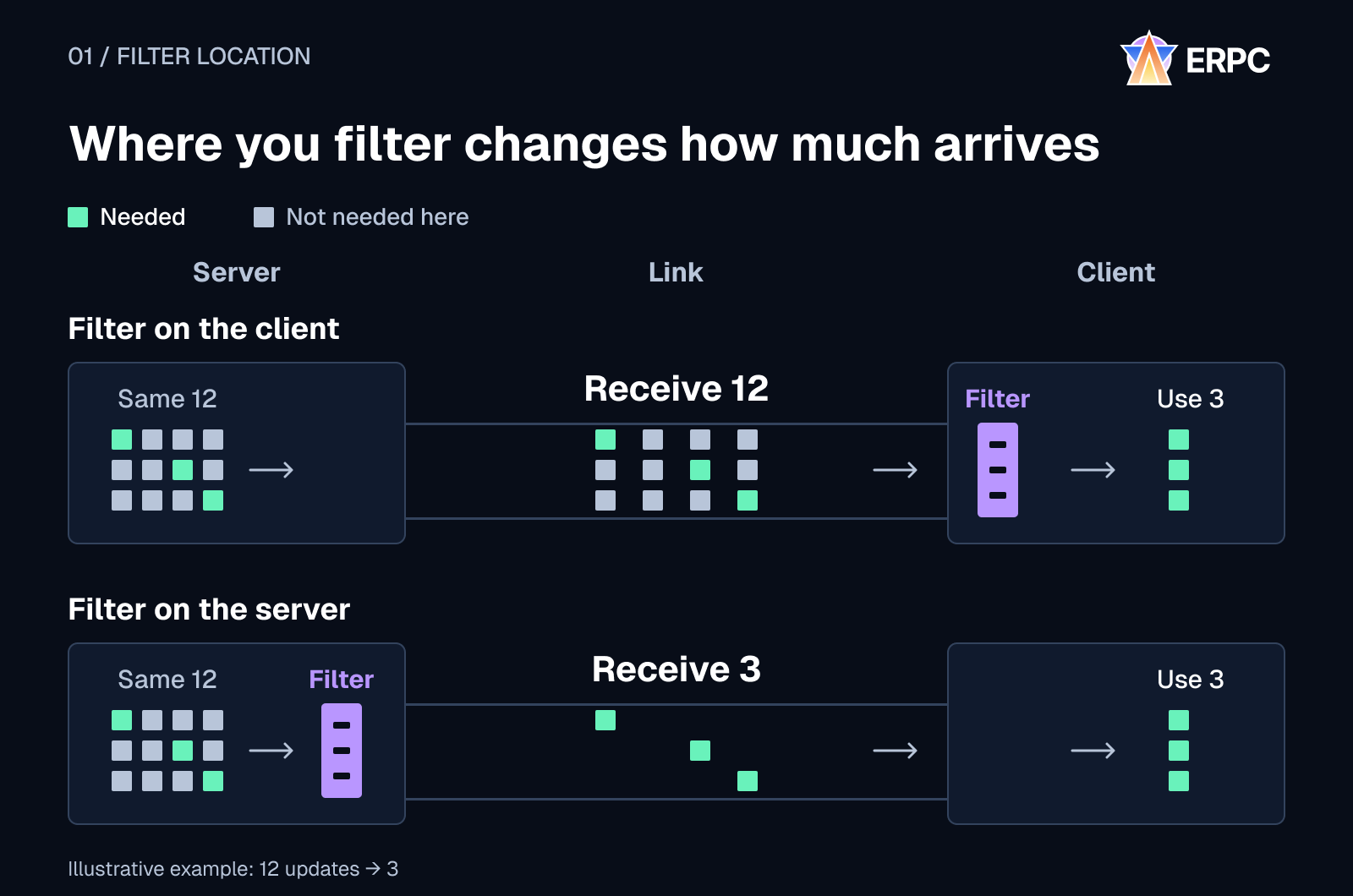
Figure 1. A schematic example with conditions that select the same 3 updates from the same 12. The upper row filters after receipt; the lower row filters before transmission. The size of each update, connection capacity, and receiver are assumed to be the same.[3][10]
The 3 updates ultimately used are identical. In the upper row, the 9 unused updates are also transported, received, read, and checked against the conditions before being excluded. In the lower row, the server still has to check the conditions, but it avoids sending those 9 unnecessary updates onward. Figure 1 compares the number of updates crossing the connection; it does not imply that filtering or receiving takes no time. Section 3 examines the waits caused by transmission, recovery from missing data, and processing at the receiver.[1][3][14][19]
A computer that processes and stores Solana data is called a node. Geyser is the mechanism that reports changes inside a node to the outside, and Yellowstone is an implementation that delivers this information over gRPC. Yellowstone Geyser gRPC can deliver account states and information about transaction processing, among other data.[2][3]
If you call an API at regular intervals, you cannot notice a change until the next request. A stream can reduce this wait. Protocol Buffers, which gRPC commonly uses, represents data in binary form according to a defined structure. Together with filtering at the provider, it helps build efficient continuous data exchange.[1][3][4]
WebSocket also supports ongoing notifications. Actual speed depends on the provider, subscription scope, network path, and processing after receipt. Connecting to gRPC alone does not determine whether an order executes or whether a trade is profitable.[3][5]
2. Define one decision before asking for everything
Let us follow two pools, A and B, that support SOL/USDC swaps. A pool is a mechanism that manages the funds and conditions used for swaps. Here, we fix the amount being sold at 1 SOL and consider a comparison screen showing “USDC received through A” alongside “USDC received through B.” The amount is chosen for illustration.
When A's state changes, the app updates A's estimate. Before comparing, it also checks that B has the required state and that it is fresh enough. If updates from B stop and the app cannot verify a state suitable for the decision, it pauses trading decisions based on this comparison. This avoids treating the difference between an old B and a new A as the current difference in swap terms.
What, then, should the app receive to calculate those estimates?
An account on Solana is a unit that stores data such as balances and program state. The term does not refer only to a human user's account. Information needed for one pool may be spread across several accounts. Even for two pools, two addresses are not necessarily enough.[6]
This needs to be checked against the target DEX's official documentation and SDK. A DEX is a mechanism for exchanging assets on a blockchain, and an SDK provides development components for using its functions. If you do not read code yourself, prepare the market URL or pool address, the assets being exchanged, and the amount, then ask AI or a developer to check the following.
Which values in which accounts does the estimate calculation read under these conditions? Trace the calculation in the SDK we will use and list each address, the value read, why it is needed, and the documentation or code checked. Check whether the required accounts change when the price or amount changes. Leave anything unknown marked as unverified instead of filling it in by guesswork.
That list becomes the starting point for defining subscription conditions. Match the required updates to the actual calculation instead of deciding solely from the mint address identifying a token or from the market name.
You can clarify the use case in these three lines.
Decision to make: Compare estimates for the same amount in A and B.
Required updates: The complete set of accounts read by both pools' estimate calculations.
Information not used in this comparison: Updates from other markets and detailed records used only for research.
Actual trading decisions also require checks such as trading costs, balances, and risk limits. Retain those inputs. Do not assume that data whose purpose is still unknown is unnecessary before checking it.
3. Which waits does reducing data remove?
Bandwidth is the capacity to carry a certain amount of data in a given time. It is a different concept from latency, the time it takes information to arrive. Here we examine three kinds of time in order: sending data onto the connection, waiting for missing data to be recovered, and waiting for processing after receipt.
First, the time to send data onto the connection
Compare receiving 10,000 updates per second, including the 100 you need, with receiving only those 100. Assuming every update has the same size of 1,000 byte, the received data volume is as follows.
| Subscription scope | Updates per second | Data per second |
|---|---|---|
| Receive a broad range and select what to use later | 10,000 | 10 MB |
| Filter at the provider down to the updates needed for the decision | 100 | 0.1 MB |
The same 100 required updates are retained, with one hundredth of the data volume. This calculation uses 1 MB = 1,000,000 byte and excludes compression and communication overhead. It is an illustrative example, not a measurement of Solana or ERPC. It also does not mean that the entire app becomes 100 times faster.
For the same connection, the time to send data can be considered as “data volume ÷ transfer capacity.” Fewer bytes to carry can reduce the time spent using the connection accordingly. The speed at which a signal travels the same distance, however, does not change. Increasing bandwidth, reducing data volume, and shortening distance each affect different parts of the process.[16]
Let us follow this distinction with fewer updates. The next diagram narrows the set being sent from 12 to 6 to 3 while retaining the same 3 required updates.
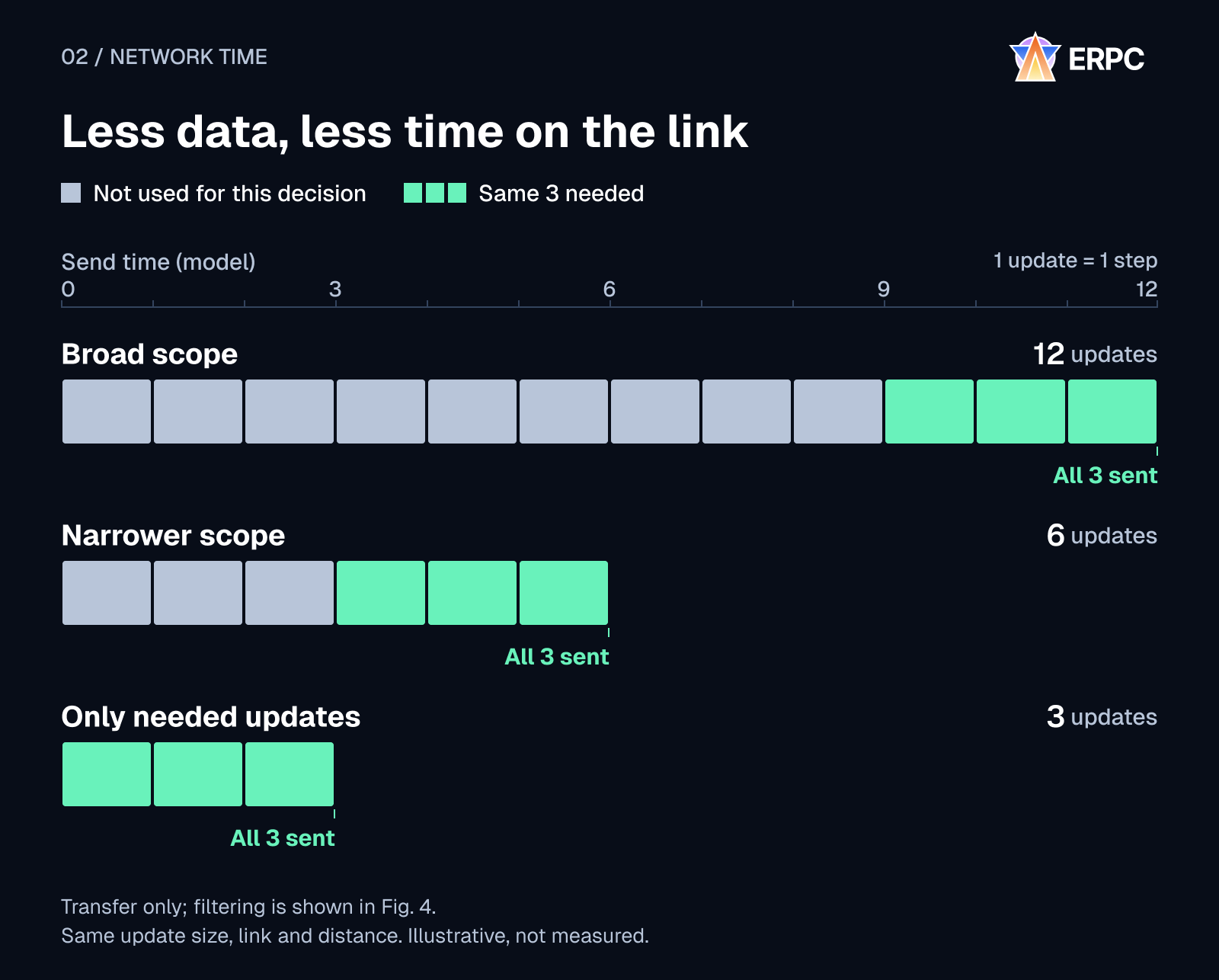
Figure 2. An explanatory model of transmission alone, with one time unit for sending one update. It assumes equal update sizes, connection capacity, and distance, and compares cases where unnecessary updates precede the 3 required ones. Each row begins when its set to transmit is ready. Filtering time is covered in Figure 4; fixed propagation time and communication overhead are omitted. These are not measurements.[16]
While the gray updates are being sent, the green updates behind them wait to be transmitted. Filtering does not change the time needed to send the 3 green updates themselves. What changes is the amount of unnecessary data using the connection ahead of them. This wait depends both on choosing server-side filtering and on how far the scope is narrowed.
Missing data you will not use can hold up required updates
Data does not necessarily arrive all at once or in the order it was sent. Some may be lost along the way or arrive out of order. TCP, which underlies the gRPC communication discussed here, infers missing data from acknowledgments and other signals, retransmits the required parts, and delivers data to the app in order. In an ordinary app, this recovery can be invisible and simply appear as a late arrival.[19][20][21]
For example, suppose data is ordered 1, 2, 3 on the same TCP connection. Data 1 arrives, data 2 is lost along the way, and data 3 reaches the receiver. Data 1 can be delivered first, but data 3 waits in temporary storage called the receive buffer until the gap left by data 2 is filled before being passed to the app.[19]
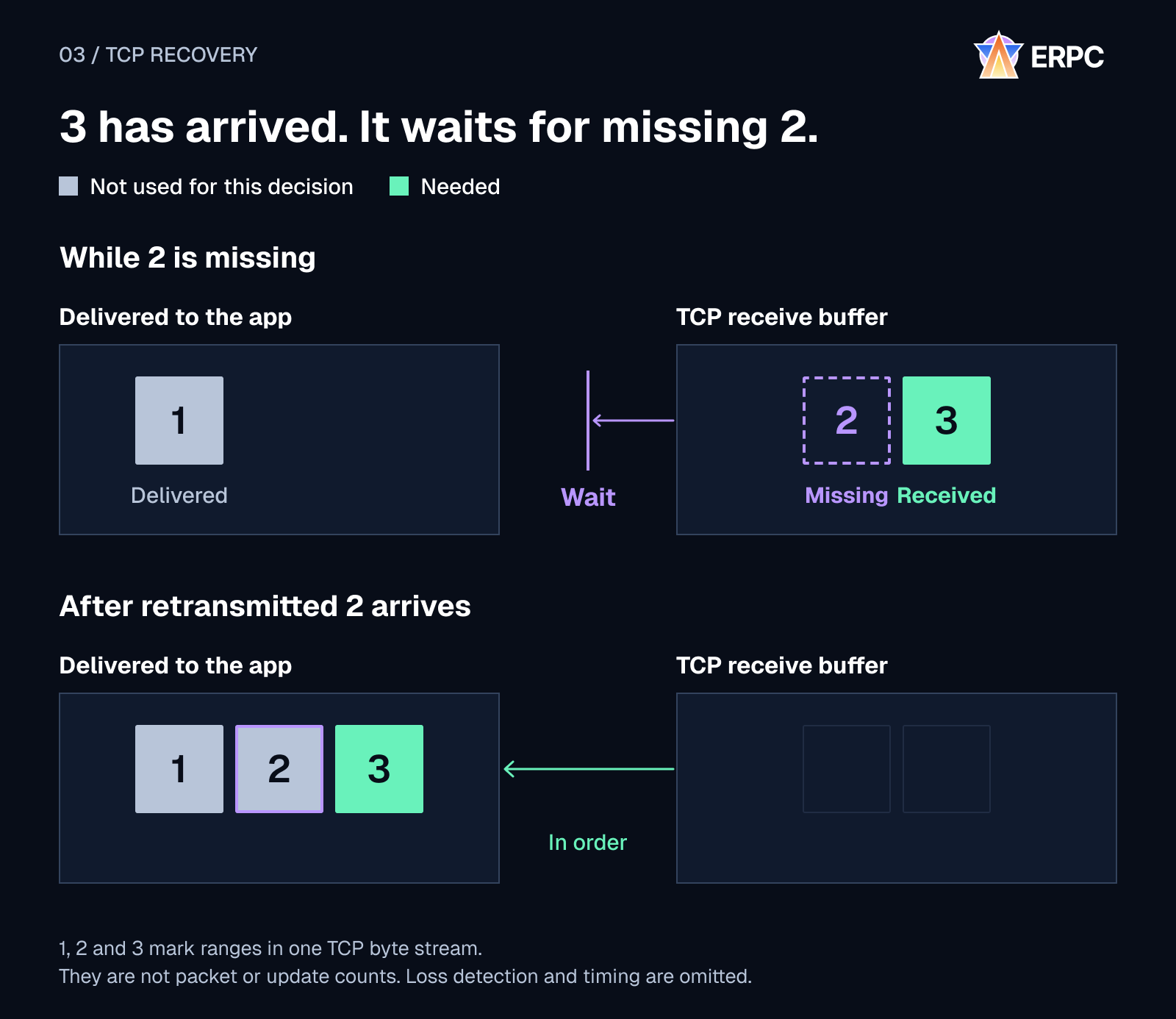
Figure 3. A schematic example on one TCP connection: part of earlier, unnecessary data is missing, so later, required data waits even though it has already been received. The numbers identify contiguous ranges of the byte stream; they do not imply a one-to-one correspondence between gRPC notifications and TCP packets. Acknowledgments, loss detection methods, and actual durations of each step are omitted.[19][21]
Even if the app would later discard data 2, TCP cannot skip it. TCP does not understand that this data is unnecessary for a particular trading decision. Required data 3 also waits for the recovery of unused data 2. This phenomenon, where a gap blocks delivery of subsequent data, is called Head-of-Line blocking, or HOL blocking. HTTP/2 does not remove this TCP ordering wait either.[19][21]
Removing unnecessary data at the server before sending avoids its transmission and reception. It also keeps that data out of the connection's recovery workload if it would have been lost. Filtering therefore also helps keep required updates from becoming involved in unnecessary recovery waits. Actual loss rates and recovery times depend on the path and conditions, so a percentage reduction in data volume cannot be translated into a percentage reduction in latency.[19]
In gRPC, one notification may travel across several communication units. Receiving it as a message requires waiting until the necessary data is complete, but it does not require waiting for the entire stream to end. Messages can be processed as they arrive.[1][20]
This also helps explain why UDP is used for low-latency communication. UDP itself does not retransmit lost data or wait to put all data in order. If a use case can use each arrival independently, it can be designed to proceed without waiting for recovery of other, earlier data. In exchange, the protocol or app above UDP must handle loss, duplication, and reordering and ensure the required inputs are available.[22]
For example, Solana Shreds are fragments of block data. There are processes for collecting the required fragments and mechanisms for recovering missing data using recovery fragments. A fragment arriving over UDP is not necessarily immediately usable for a trading decision. The content received also differs from Yellowstone Geyser gRPC update notifications. The next thing to learn is not just how to switch to UDP, but what can proceed without waiting and which missing inputs still need to be recovered.[2][23]
For now, first check whether your current gRPC subscription conditions can reduce received volume while retaining required updates.
Receiving and filtering still take work after data arrives
There are also mechanisms that hold back transmission so it does not exceed what the receiver can accept. If reading at the receiver cannot keep up, the wait can extend back to the sender. Narrowing the volume helps both reduce traffic and move required updates forward.[7][21]
The receiver has work to do as well. It takes in the arriving bytes, decodes them into a form the app can use, and checks whether they are needed. Even updates discarded later consume CPU time before the decision to discard them is made.[4][14][15]
Figure 4 considers a case with 3 unnecessary updates followed by 1 required update. It compares work on the connection and at the receiver over time when the same conditions can be moved to the server. To make the explanation easy to follow, each operation is assumed to take one time unit. Here, “one worker” means an execution path that processes arriving notifications one at a time, in order.
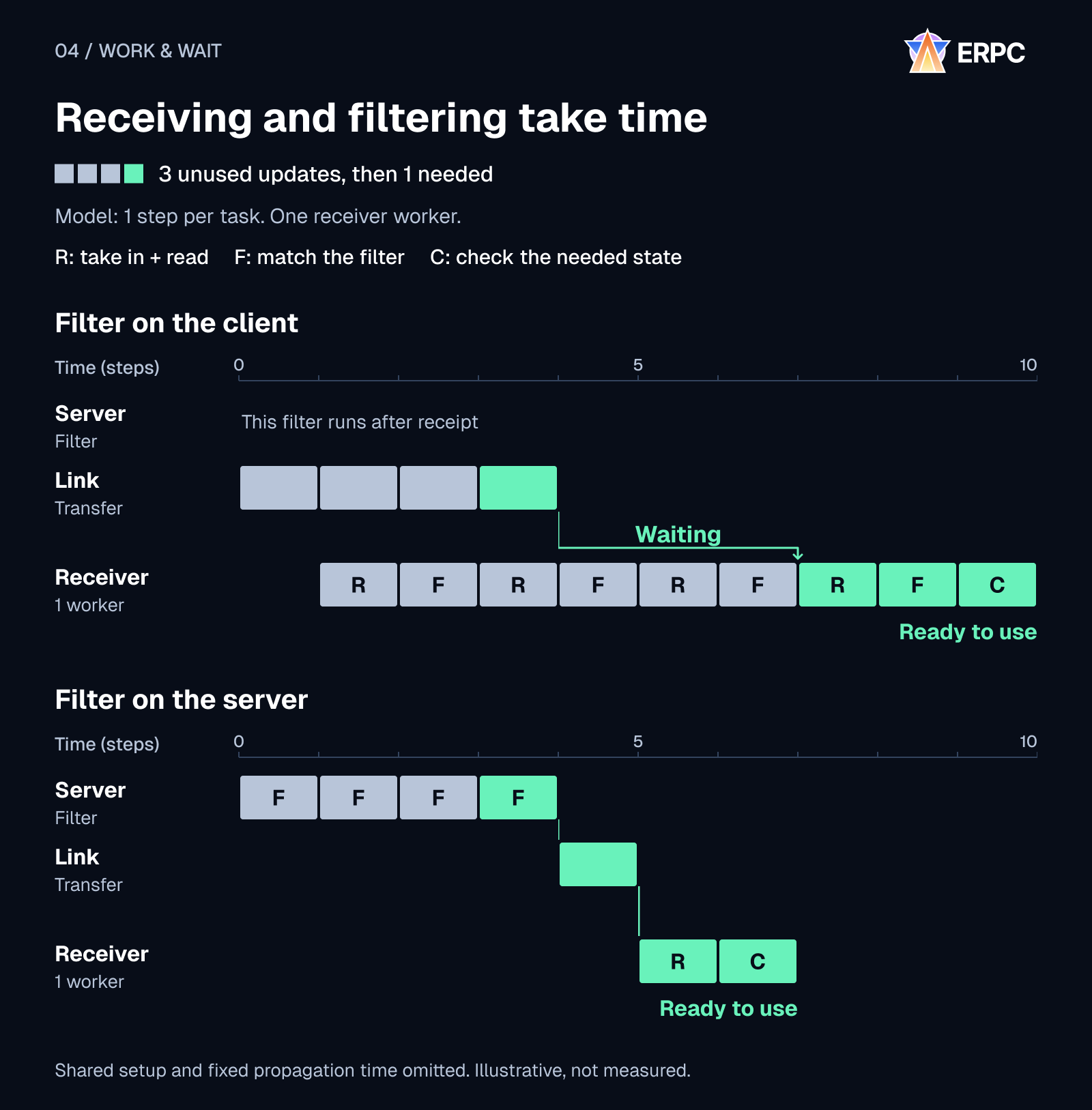
Figure 4. An explanatory model with 3 unnecessary updates and 1 required update available at the start, assuming each operation takes the same one time unit. One worker handles the receiving side, in parallel with the connection and server. “R” means the receiving worker takes in and reads the data; “F” means checking whether it matches the filter; “C” means checking the required state. Even one update involves several stages, such as R and F. Shared transmission preparation and time due to distance are omitted. The diagram shows neither measured values nor a speed multiplier.
Follow the green update in the upper row. Even after the data has crossed the connection, the receiving worker is still reading or filtering gray updates. The green update waits here until its own processing can begin. Updates discarded as unnecessary still required both reception and filtering.
In the lower row, all 4 filtering operations at the server remain. As a result, the receiver handles only the green update. Receiving and reading it still take work, as do checking the required state and freshness before a decision. In this example, even though transmission of the green update finishes later than in the upper row, it becomes usable sooner. Arrival and readiness for a decision are different things.
Actual processing times vary with condition complexity, data size, implementation, arrival order, and parallelism. The diagram's time units cannot be directly converted into an improvement rate for your environment. What matters is identifying the unnecessary work queued ahead of the required processing.[11][12][13]
One potentially confusing aspect of a broad stream is that this volume grows independently of how often you make requests. Every change within the subscribed scope produces updates. One transaction can change several accounts, and transaction notifications can include logs and balance changes, so transaction counts, notification counts, and byte counts are not the same.[2][3]
Compared with an API used to fetch a balance only when needed, a design that continuously receives changes across a broad market has more data to process continuously. The workload depends on subscription scope and update frequency, not on APIs being large or small in general.
If 10,000 updates arrive per second but only 8,000 can be processed, the unprocessed backlog grows by 2,000 every second, assuming no discarding or limits. This line of pending work is a queue. Making the queue larger does not remove the gap between the arrival rate and processing capacity. If gRPC regulates transmission, some waiting may move into the communication library or back to the sender.[7]
You need to check separately whether logs are flowing and whether decisions are being made from up-to-date data.
4. Filter at the provider and focus the receiver on necessary checks
Once you know which updates A and B need, specify the conditions in the receiving app's subscription settings. When the provider uses these conditions to select data before transmission, that is server-side filtering. The available conditions are limited to what the provider supports. Removing unnecessary inputs early reduces transmission and receiving-side work for that subscription.[3]
Setting one filter does not finish the job. If many updates from markets you do not yet use still arrive, check whether you can narrow the targets further. If you can identify which part of an account's data you read,
accounts_data_slice can reduce the portion received. Reducing update counts and reducing bytes per update both affect transmitted volume.[3][8]When optimizing for low latency, the goal is to have all the information needed for the decision while reducing the data carried and work performed for it to what is necessary and sufficient. If missing information makes you wait for another request, you move away from that goal. Refine the settings against the list of values read and reasons they are needed from Section 2.
Not every check can be delegated to the provider. For example, an implementation may select the target program or accounts at the provider, then identify instruction types in the app. Checks against your own state, freshness, and risk conditions required for the decision also remain. Think of this as combining earlier filtering that can be moved with a receiver focused on necessary checks.[17]
First, share the following distinction with the person configuring the subscription.
| What you want to know | Notification to select | Yellowstone field |
|---|---|---|
| That the specified account's own state changed | Account update | account within accounts |
| The contents and result of a transaction containing the specified address | Transaction notification | account_include within transactions |
Account updates provide information about state; transaction notifications provide information about transactions that ran. Neither necessarily arrives as a ready-made price at which you can trade a given amount now. In the A and B example, the app collects the state needed for the estimates and calculates them itself.[3][8]
Next are some points to watch when selecting transaction notifications. In the following table, the two filter addresses are called X and Y to distinguish them from pools A and B above. Asking for transactions involving X or Y produces a different set from asking for transactions containing both X and Y.
| Addresses present in the transaction | X or Y: account_include | Both X and Y: account_required |
|---|---|---|
| X only | Delivered | Not delivered |
| Y only | Delivered | Not delivered |
| Both X and Y | Delivered | Delivered |
| Neither | Not delivered | Not delivered |
The table assumes X and Y are specified in each respective condition. If you want transactions involving either X or Y but filter for only those containing both, you miss required notifications. Even when someone else configures it, asking “Will it arrive if only X is present?” helps verify the intent.[8]
Appendix 2 collects examples of subscription conditions and other filters.
5. Separate broad discovery from the decision you need now
While comparing A and B, you may also want to find a better candidate C. As the number of monitored targets grows, these jobs overlap. Keep discovering new opportunities while allowing the current A/B decision to proceed without waiting for discovery to finish.
For example, even if you monitor 90,000 accounts to find candidates, does all of their analysis and storage need to sit ahead of the A/B decision? If work unrelated to the current decision is queued first, you can review how the work is separated.
The number 90,000 is not itself a threshold for splitting work. Look at updates per second, byte counts, and required processing. A few accounts with concentrated activity can impose more work than many accounts with infrequent updates.
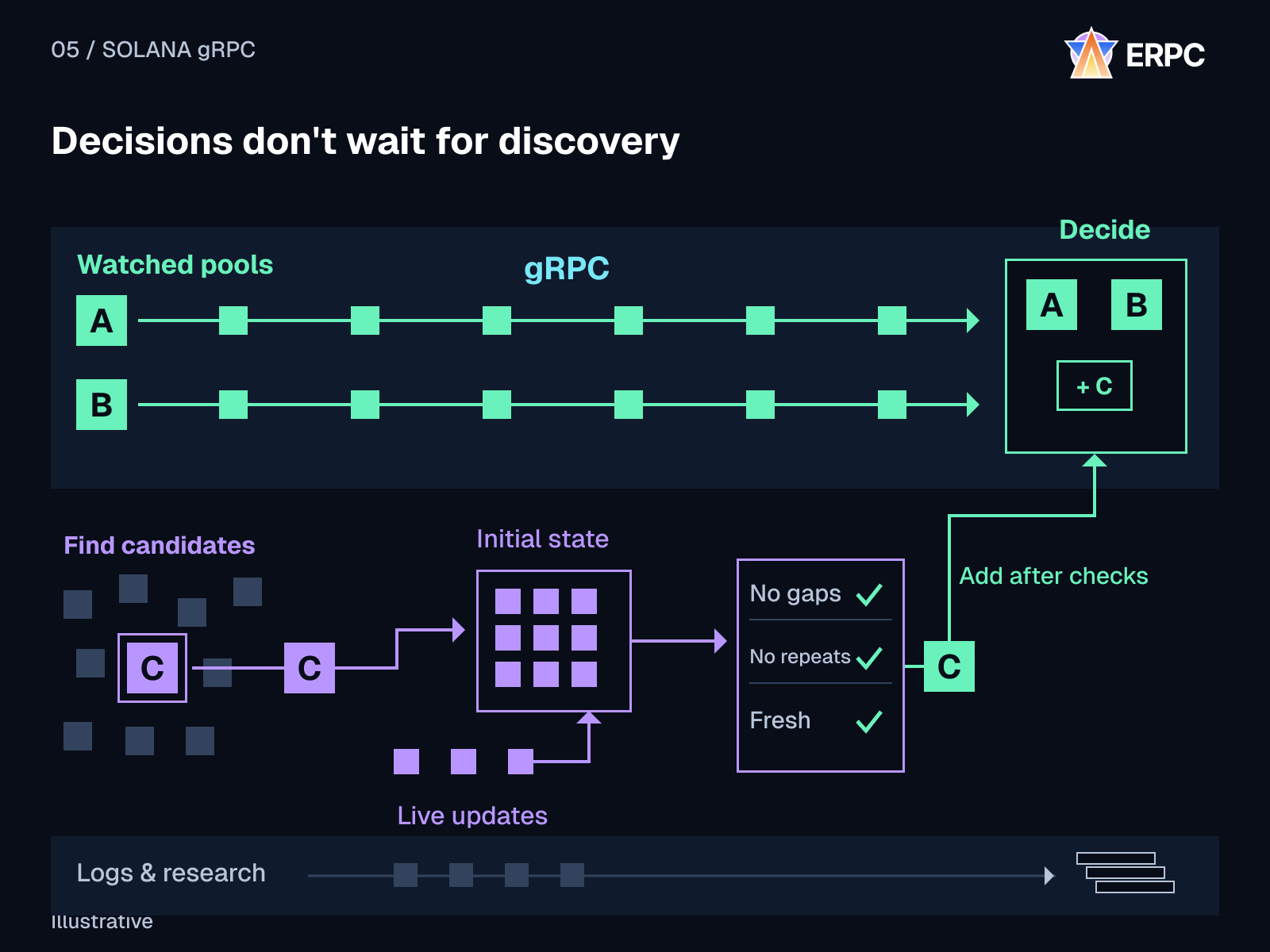
Figure 5. A/B updates proceed to the decision without waiting for discovery. Candidate C is added after its initial state and ongoing updates are collected and gaps, duplicates, and freshness are checked. This design example retains A/B monitoring and runs recording and research as separate work.
When C is first discovered, the values needed for an estimate may not yet be available. The state prepared at the beginning is the initial state. Updates occurring while it is being obtained must also be captured and combined into a state suitable for the decision. Time from discovery to this point also matters when trying to capture an opportunity.[3]
When splitting work, consider both separate connections and actual separation of processing. Two connections still leave a queue if their data is later gathered into the same single worker. First check whether work such as storage is delaying estimate calculations, then assign workers, queues, and resources according to their roles. Giving every low-load target its own connection can increase connection management and duplicate processing.[18]
If you later compare information from separate paths, arrival order alone does not establish that the states are aligned. Identify which target and update each item belongs to, and manage freshness and gaps. Subscribing to the same information over different connections also increases total transmitted volume and processing work.[1]
If you change discovery scope or frequency as well, check whether the required candidates were found and how long it took from discovery to being ready for a decision. Preserve both the ability to lighten the current decision's workload and the ability to find the next opportunity.
6. What to check first in your own environment
After reading this far, first write down one decision you want to make. Your next action depends on the environment you currently use.
| Current situation | First action |
|---|---|
| You use a ready-made trading tool | Prepare the tool's name and the decision you want to make, then check whether it can receive Yellowstone Geyser gRPC and whether users can configure it |
| You are about to build or commission an app | Decide the market and amount, use the request in Section 2 to identify the required inputs, then verify reception with a small subscription |
| You already have receiving code | Ask for a plain-English explanation of the current subscription conditions and a list of which updates serve which decisions |
Your first request to AI or a developer can be as short as the following. If you have code, provide it in an environment that can read the project.
text
Tool/project in use: [Name. If none yet, write “to be built”]
Decision I want to make: [Example: Compare estimates for selling the same amount of SOL in A and B]
What concerns me: [Example: The screen is updating, but could it be comparing stale states?]

Can this environment use Solana Yellowstone Geyser gRPC updates? Explain in language I can understand what we receive and which calculations or decisions use it. If code already exists, locate where subscriptions are created and how the inputs are used. If it does not, check support and the preparation required. Mark unknowns as unverified, and first return an explanation and one thing to check first.
Tool/project in use: [Name. If none yet, write “to be built”]
Decision I want to make: [Example: Compare estimates for selling the same amount of SOL in A and B]
What concerns me: [Example: The screen is updating, but could it be comparing stale states?]
Can this environment use Solana Yellowstone Geyser gRPC updates? Explain in language I can understand what we receive and which calculations or decisions use it. If code already exists, locate where subscriptions are created and how the inputs are used. If it does not, check support and the preparation required. Mark unknowns as unverified, and first return an explanation and one thing to check first.If you run connection code yourself, ERPC's quickstart lets you choose a connection example for your language. Check the gRPC URL in the dashboard and your registered source IP, then start with a small set of targets where you can confirm that updates are occurring.[9][10]
ERPC gRPC quickstart:
https://erpc.global/en/doc/geyser-grpc/quickstart/
The first milestone is receiving one update for a specified target and being able to explain which account it concerns and which data will be used in the estimate. Receiving one update alone does not mean all the state needed for the decision is available. If connection or reception fails, go to the symptom table in Appendix 1.
7. Verify improvements through volume, waiting, and correctness
If you already have a subscription, compare the inputs used by one decision with the inputs you currently receive. Retain required updates, reduce unrelated inputs, and check the following four points. Mark anything not yet measured as unverified and begin with what lets you understand the current situation.
| What to check | What you want to learn |
|---|---|
| Received update count and received byte count | Which work decreased |
| Amount of queued work and age of the oldest item | Whether waiting keeps growing |
| Time from receipt of a required update to completion of the decision | Whether the intended decision is reached sooner, and how both typical and slow cases changed |
| Retention of required updates and decision results | Whether apparent speed comes from dropping information |
Compare bytes at the same observation point with the same definition; do not mix traffic carried on the network with data read by the app. Likewise, timing does not include work before the measurement begins. For example, starting a timer in a handler called after data has been decoded does not tell you the earlier reception and decoding time. If you also need to know the time from creation at the node to arrival, separately check observation points and clock synchronization.[1][4][14]
If the same recorded input can be used before and after the change, compare decision results and processing times for the same required updates. Check bursts of updates and the slower end of the timing distribution as well as the median, and count missing and unprocessed updates separately. Faster processing of only the portion that was handled is not enough to establish improvement. Distinguish what replay can verify from what must be checked against the actual provider-side filter and network connection.
Ask the person making the change to report the inputs retained and their purpose, the inputs reduced and why, how retention of required updates was verified, the comparison of waits, and unresolved questions. This makes the meaning of the change easier to follow. There is no need to fill unmeasured fields with estimated improvement percentages.
Start by being able to explain one thing: which decision uses this update? Once that relationship is clear, you can consider which wait to reduce next to make effective use of a fast connection or CPU.
Appendix 1: Checks for connection and reception problems
Use this appendix when connecting, or when connection or reception problems occur.
For your first connection, use ERPC's quickstart and begin with a small target where you can verify that updates occur. Check the gRPC URL shown in the dashboard, your registered source IP, and the connection method. An authentication token in a generic sample is not necessarily required for ERPC.[9][10]
Receiving one update is different from having all the state needed for a decision. Check a procedure that also captures updates occurring while the initial state is being fetched, and begin making decisions only once the required values and freshness are available.
Use the symptom to choose where to look first.
| Observed symptom | First things to check |
|---|---|
| Cannot connect | gRPC URL, whether TLS is used, port, registered IP, SDK version, and connection requirements |
| Connected but no updates arrive | Whether the target is changing, notification type, and the filter's “any/all” semantics |
| Delay grows over time | Arrival and processing counts, received byte count, and age of the oldest queued work |
| Arrivals are sometimes very late despite spare CPU capacity | TCP retransmissions in the same period, path delay variation, and drops at the receiver; do not assume CPU queuing is the only cause |
| A particular large notification fails | Error details and maximum receivable size of one message |
| Connection drops regularly | The first error, ping handling, intermediary timeout conditions, and reconnection method |
The HTTP/2 receive window regulates how much data can be received from the peer. It is separate from the app's processing queue and the maximum size of one message. Adjustment may be needed if an unsuitable window caps transfer throughput, but simply enlarging it does not speed up CPU processing or database writes.[7][9]
A TCP byte stream, an HTTP/2 DATA frame, and one gRPC message are different units. One gRPC message may span several DATA frames. Do not assume one notification arrives in full in a single receive operation; let the SDK assemble messages. HTTP/2 flow control has two windows: one for each stream and one for the entire connection.[19][20][21]
Shared services also limit permitted subscription conditions and connection counts. ERPC's shared gRPC does not support subscriptions using
blocks, whether filtered or unfiltered. Check the current FAQ and contract terms.[9]A Slow Reader response means a problem has been observed with receiving progress or delivery delay. Do not conclude from that alone that CPU capacity is insufficient. Investigate the connection, loss, receive settings, and processing after receipt separately. Preserve the error before reconnecting, and follow any retry time returned by the service.[9]
Receiving new updates after reconnecting does not necessarily fill the gaps from the disconnection. Fetch the required state again, reconcile duplicates and gaps, and verify consistency and freshness before resuming decisions. Also,
processed is an observation at an early stage. For work requiring a finalized result, verify that the required level of certainty has been reached.[3]Check bandwidth units as well. In theory, 1 Gbps can carry 1 billion bit per second. Since 1 byte is 8 bit, this equals 125 MB per second. Communication overhead and shared segments mean this is not a promise that the app can always receive that amount.
Appendix 2: Subscription examples and filter reference
Once you have identified the full set of required accounts in Section 2, you can put them into conditions such as the following.
quote_state is a subscription name you choose; the text in angle brackets is replaced with actual addresses. This is an example of the conditions, not ready-to-run connection code.[8]json
{
  "accounts": {
    "quote_state": {
      "account": ["<required account 1>", "<required account 2>"]
    }
  }
}
{
"accounts": {
"quote_state": {
"account": ["<required account 1>", "<required account 2>"]
}
}
}Add these conditions to the subscription request in the SDK you use. Protocol Buffers field names and SDK names can differ, so follow the connection example and type definitions for your version instead of assuming you send this JSON directly.
Connection examples: https://erpc.global/en/doc/geyser-grpc/quickstart/
Filter code examples: https://erpc.global/en/doc/geyser-grpc/filter/
The following are Yellowstone's Protocol Buffers field names. A TypeScript SDK may use names such as
accountInclude and accountsDataSlice. Follow the type definitions for the SDK and version you actually use.[8]| Field | What it selects or reduces | Points to check |
|---|---|---|
accounts.account | Account updates at specified addresses | Check that no related accounts required for the decision are missing |
accounts.owner | Accounts managed by the specified program | This is not the owner of a user's wallet; the scope can be broad |
memcmp and datasize in accounts.filters | Conditions based on data contents and size | Check the target layout. ERPC Shared also requires target selection such as account or owner; memcmp and datasize alone cannot be used.[9] |
transactions.account_include | Transactions containing any address in the specified list | Adding addresses broadens the scope |
transactions.account_required | Transactions containing every address in the specified list | Watch for missed transactions if your intent is to capture those containing X or Y |
transactions.account_exclude | Excludes transactions containing any address in the specified list | Check whether required transactions would also be excluded |
transactions.failed = false | Limits results to successful transactions | Failure analysis and monitoring your own transactions also require failure information |
accounts_data_slice | Receives only part of an account's data | Does not reduce update count or trim transaction logs; check that all required bytes remain |
accounts_data_slice applies in common to account notifications within the same subscription request. If you receive accounts with different layouts together, check that the required ranges remain available for all of them.[8]When
include and required are specified within a transaction filter with the same name, both conditions must be met. Filters with different names, however, are evaluated independently. Splitting names in an attempt to tighten conditions can instead broaden what you receive.[8]Empty specifications also differ.
json
{ "transactions": {} }{ "transactions": {} }This registers no transaction subscriptions and does not request transaction notifications.
json
{ "transactions": { "all": {} } }{ "transactions": { "all": {} } }This requests an unrestricted subscription named
all. ERPC's shared gRPC does not allow this subscription without conditions.[9] The two forms do not mean the same thing. These are partial examples to explain the difference, not complete connection code.[8][9]A
SubscribeRequest that updates normal subscription conditions replaces the previous conditions. Do not assume that sending only new targets appends them; manage the complete set, including conditions you want to retain. Distinguish ping-only requests from this update operation.[3][8]Appendix 3: An AI prompt for improving existing code
This detailed request helps you move on to improving subscriptions in existing code. After using the short request in Section 6 to establish your use case and current situation, you can give it to an AI agent that can read the project's code. Replace only
[decision I want to make] with your own use case. If you do not know it, you can begin with “identify it from the current code.”text
Review the Yellowstone Geyser gRPC subscriptions in this Solana app and reduce unnecessary work and waiting from receipt to decision without losing required updates.
Decision I want to make: [decision I want to make]

1. Check the README, development rules, existing changes, and SDK, language, and runtime versions. Read the current official documentation and implementation for the relevant versions. Trace the path from subscription request construction through receiving, decoding, filtering, state updates, and decisions, identifying the actual files and functions. Also check which processing has already completed before the receiving callback starts.

2. Identify the accounts, transactions, balances, and risk conditions read by the decision, and classify inputs as required, used only for discovery or research, or of unknown purpose. Do not assume inputs of unknown purpose are unnecessary. Also check how initial state is obtained when switching to a new target.

3. Explain the current subscription conditions in natural English. Check accounts versus transactions, include/exclude/required, combinations within a single filter versus filters with different names, and empty maps versus empty conditions. Check owner, memcmp, and data slice against the target program's actual data layout.

4. Save the conditions and observations before the change. Check received update and byte counts, completed processing count, queue item and byte counts, the age of the oldest queued item, and time from receiving a required update to the decision. Identify measurement points, compare bytes at the same observation point with the same definition, and mark values that cannot be measured as unmeasured.

5. Separate filtering conditions that can move to the server from necessary checks that must remain at the receiver. Examine scope, update count, and bytes per update separately to find where further narrowing is possible while retaining required inputs. Show which transmission, receiving, decoding, and filtering work can be reduced, and implement the smallest justified change within existing permissions and development procedures. If broad discovery is needed, consider separating its role from immediate decisions. When splitting work, check actual execution resources, duplicate subscriptions, state merging, retention of the complete settings during subscription changes, and resynchronization after gaps. Set queue limits and behavior when full; do not silently drop required events.

6. If the same recorded input is available, replay normal and burst conditions to verify that known required events remain and decision results match expectations. Compare processing time over the same set of required events, and separately report missing and unprocessed counts. If timing can be measured, report the median and values from the slower end as well. Do not classify a lack of arriving inputs caused only by a narrower subscription as a speed improvement. Do not treat replay alone as verification of the real server's filter or the actual network connection. If discovery also changes, compare candidate discovery results and the time until the state is ready for a decision.

7. If connection problems occur, retain the first error and use symptoms to distinguish URL, authentication, IP, TLS, both HTTP/2 windows, the per-message limit, CPU, I/O, and network issues. Distinguish reconnecting from recovering missing data, and follow the retry time returned by the service.

This request alone does not add permission for production changes, paid contracts, load testing, or submitting real trades. Do not output private keys, credentials, or customer data. Do not force changes where there is no problem, and explicitly state unclear requirements or checks you cannot perform.

Finally, report subscription conditions before and after, evidence that required updates were preserved, comparison conditions and results, remaining limitations, and the next step. Do not invent improvement percentages that have not been measured.
Review the Yellowstone Geyser gRPC subscriptions in this Solana app and reduce unnecessary work and waiting from receipt to decision without losing required updates.
Decision I want to make: [decision I want to make]
1. Check the README, development rules, existing changes, and SDK, language, and runtime versions. Read the current official documentation and implementation for the relevant versions. Trace the path from subscription request construction through receiving, decoding, filtering, state updates, and decisions, identifying the actual files and functions. Also check which processing has already completed before the receiving callback starts.
2. Identify the accounts, transactions, balances, and risk conditions read by the decision, and classify inputs as required, used only for discovery or research, or of unknown purpose. Do not assume inputs of unknown purpose are unnecessary. Also check how initial state is obtained when switching to a new target.
3. Explain the current subscription conditions in natural English. Check accounts versus transactions, include/exclude/required, combinations within a single filter versus filters with different names, and empty maps versus empty conditions. Check owner, memcmp, and data slice against the target program's actual data layout.
4. Save the conditions and observations before the change. Check received update and byte counts, completed processing count, queue item and byte counts, the age of the oldest queued item, and time from receiving a required update to the decision. Identify measurement points, compare bytes at the same observation point with the same definition, and mark values that cannot be measured as unmeasured.
5. Separate filtering conditions that can move to the server from necessary checks that must remain at the receiver. Examine scope, update count, and bytes per update separately to find where further narrowing is possible while retaining required inputs. Show which transmission, receiving, decoding, and filtering work can be reduced, and implement the smallest justified change within existing permissions and development procedures. If broad discovery is needed, consider separating its role from immediate decisions. When splitting work, check actual execution resources, duplicate subscriptions, state merging, retention of the complete settings during subscription changes, and resynchronization after gaps. Set queue limits and behavior when full; do not silently drop required events.
6. If the same recorded input is available, replay normal and burst conditions to verify that known required events remain and decision results match expectations. Compare processing time over the same set of required events, and separately report missing and unprocessed counts. If timing can be measured, report the median and values from the slower end as well. Do not classify a lack of arriving inputs caused only by a narrower subscription as a speed improvement. Do not treat replay alone as verification of the real server's filter or the actual network connection. If discovery also changes, compare candidate discovery results and the time until the state is ready for a decision.
7. If connection problems occur, retain the first error and use symptoms to distinguish URL, authentication, IP, TLS, both HTTP/2 windows, the per-message limit, CPU, I/O, and network issues. Distinguish reconnecting from recovering missing data, and follow the retry time returned by the service.
This request alone does not add permission for production changes, paid contracts, load testing, or submitting real trades. Do not output private keys, credentials, or customer data. Do not force changes where there is no problem, and explicitly state unclear requirements or checks you cannot perform.
Finally, report subscription conditions before and after, evidence that required updates were preserved, comparison conditions and results, remaining limitations, and the next step. Do not invent improvement percentages that have not been measured.References and further reading
- [1] gRPC official documentation: Core concepts, architecture and lifecycle https://grpc.io/docs/what-is-grpc/core-concepts/
- [2] Anza official documentation: Geyser plugin https://docs.anza.xyz/validator/geyser/
- [3] Yellowstone developer Triton: Dragon's Mouth gRPC https://docs.triton.one/solana/real-time-streaming/dragon-s-mouth-grpc
- [4] Protocol Buffers official documentation: Overview https://protobuf.dev/overview/
- [5] Solana official documentation: WebSocket methods https://solana.com/docs/rpc/websocket
- [6] Solana official documentation: Accounts https://solana.com/docs/core/accounts
- [7] gRPC official documentation: Flow Control https://grpc.io/docs/guides/flow-control/
- [8] Yellowstone definitions and implementation, reviewed revision: b9a4f56a43a1858c63bfe8c3904b98ef416ae1a9 https://github.com/rpcpool/yellowstone-grpc/blob/b9a4f56a43a1858c63bfe8c3904b98ef416ae1a9/yellowstone-grpc-proto/proto/geyser.proto https://github.com/rpcpool/yellowstone-grpc/blob/b9a4f56a43a1858c63bfe8c3904b98ef416ae1a9/yellowstone-grpc-geyser/src/plugin/filter/filter.rs
- [9] ERPC: Geyser gRPC FAQ https://erpc.global/en/faq/grpc/general/
- [10] ERPC: Geyser gRPC quickstart and filters https://erpc.global/en/doc/geyser-grpc/quickstart/ https://erpc.global/en/doc/geyser-grpc/filter/
- [11] Node.js official documentation: Don't Block the Event Loop (or the Worker Pool) https://nodejs.org/learn/asynchronous-work/dont-block-the-event-loop
- [12] Node.js official documentation: The Node.js Event Loop https://nodejs.org/learn/asynchronous-work/event-loop-timers-and-nexttick
- [13] Microsoft official documentation: Multiple Processors https://learn.microsoft.com/en-us/windows/win32/procthread/multiple-processors
- [14] Linux Kernel official documentation: Scaling in the Linux Networking Stack https://docs.kernel.org/networking/scaling.html
- [15] Redis official documentation: Pipelining, “It's not just a matter of RTT” https://redis.io/docs/latest/develop/using-commands/pipelining/
- [16] Kurose and Ross: Networking material distinguishing transmission time from propagation time https://gaia.cs.umass.edu/kurose_ross/interactive/end-end-delay.php
- [17] Quicknode: Monitoring programs with Solana gRPC, “Add some client-side filters” https://www.quicknode.com/guides/solana-development/tooling/solana-grpc/solana-grpc
- [18] Shyft: Solana gRPC Best Practices, “Distribute Load” and “Connection Efficiency” https://docs.shyft.to/solana-yellowstone-grpc/solana-grpc-best-practices
- [19] IETF: RFC 9293 TCP, “Key TCP Concepts” and “SEND Call” https://www.rfc-editor.org/rfc/rfc9293.html
- [20] gRPC official documentation: gRPC over HTTP2, “Length-Prefixed-Message” and “Data Frames” https://github.com/grpc/grpc/blob/master/doc/PROTOCOL-HTTP2.md
- [21] IETF: RFC 9113 HTTP/2, “Flow Control” and “The Flow-Control Window” https://www.rfc-editor.org/rfc/rfc9113.html
- [22] IETF: RFC 8085 UDP Usage Guidelines, “Reliability Guidelines” https://www.rfc-editor.org/rfc/rfc8085.html
- [23] Solana Foundation: Shred packets https://github.com/solana-foundation/specs/blob/main/p2p/shred.md
- Explore waiting after receipt: Reviewing Solana gRPC data volume, receiving work, and execution environments https://erpc.global/en/news/2026/11/20/erpc-solana-grpc-stream-backpressure-20261120/
- Learn more about separating work: Low-latency architecture for Solana HFT https://erpc.global/en/news/2026/11/21/erpc-solana-hft-architecture-patterns-20261121/
- Connection requirements and support: ERPC Dashboard https://dashboard.erpc.global/en/